


cPanel Dashboard Explained: Searching for Features and Understanding the Interface
The cPanel Dashboard is the central management interface for your hosting account. Here you will find essential features for email, domains, files, databases, security, statistics, backups, and other settings.
cPanel can seem overwhelming when you log in for the first time. However, by using the search function, categories, and understanding its basic structure, you will find the tools you need quickly and reliably.
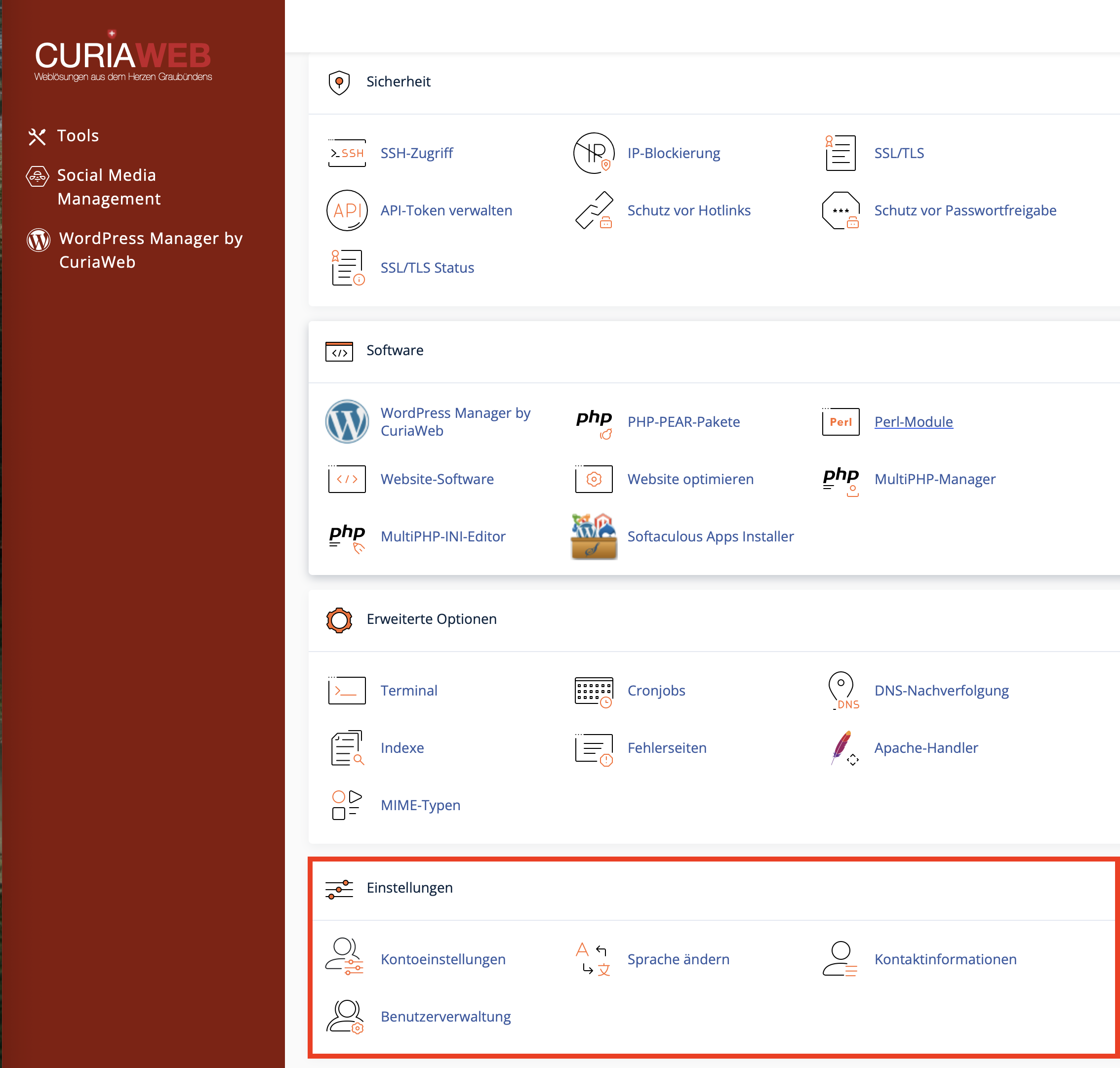
What is the cPanel Dashboard?
The dashboard is the cPanel home page. From here, you can access the most important management areas of your web hosting. Features are grouped into categories to help you find similar tasks more quickly.
Typical categories in cPanel include:
- Files: File Manager, FTP Accounts, Backups, and Disk Usage.
- Databases: MySQL Databases, Database Wizard, phpMyAdmin, and Remote MySQL.
- Domains: Domains, Subdomains, Redirects, and DNS-related functions.
- Email: Email Accounts, Forwarders, Autoresponders, Spam Filters, and Deliverability.
- Security: SSL/TLS, Two-Factor Authentication, IP Blocker, and other protective features.
- Metrics: Visitor Statistics, Bandwidth, Error Logs, and Resource Usage.
- Preferences: Language, Contact Information, User Manager, and Account Settings.
Using the Search Function in cPanel
The fastest way to find a feature is by using the search bar at the top of the cPanel Dashboard. Simply enter a relevant term there. cPanel filters the available functions instantly as you type.
| If you want to... | Possible Search Terms |
|---|---|
| edit a file | File Manager, Files |
| create an email address | Email, Email Accounts |
| manage a database | Database, MySQL, phpMyAdmin |
| check an SSL certificate | SSL, TLS, AutoSSL |
| search for backups | Backup, JetBackup (if available) |
| change the language | Language, Change Language |
Why Some Features May Not Be Visible
Not every cPanel interface looks exactly the same for every hosting account. Which features are displayed depends on several factors.
- Hosting Package: Some features are only available in specific packages or on certain servers.
- Server Configuration: The provider can enable, disable, or restrict specific functions.
- cPanel Version: New features may look or be named differently depending on the server's current updates.
- Theme or Style: The visual layout may vary slightly depending on the active cPanel theme.
- Security Policies: Certain options may be intentionally disabled for security reasons.
Understanding cPanel Categories
Many support requests arise because it is unclear which category a specific function belongs to. The following overview will help you find your way around.
| Category | Typical Tasks |
|---|---|
| Files | Upload, edit, or delete website files; manage FTP access; check disk space usage. |
| Databases | Create MySQL/MariaDB databases, assign users, open phpMyAdmin, import or export databases. |
| Domains | Manage domains, create subdomains, set up redirects, verify DNS-related settings. |
| Create email accounts, set up forwarders, configure spam filters, check email deliverability. | |
| Security | Manage SSL/TLS certificates, enable 2FA, block IP addresses, configure directory protection. |
| Preferences | Change interface language, update contact information, use User Manager, adjust account settings. |
Finding the Right Tool for the Right Task
In cPanel, there are often multiple tools that sound similar but perform entirely different tasks. The following overview helps prevent confusion.
| Task | Correct Tool | Do Not Confuse With |
|---|---|---|
| Edit website files | File Manager | phpMyAdmin, because it only manages databases. |
| Edit database tables | phpMyAdmin | File Manager, because database contents cannot be edited as standard files. |
| Create an email address | Email Accounts | Forwarders, as these only route emails to another address. |
| Secure website with HTTPS | SSL/TLS or SSL/TLS Status | DNS Zone, since DNS records alone do not install an SSL certificate. |
| Create a database | MySQL Databases or Database Wizard | phpMyAdmin, which is primarily used to manage the content of existing databases. |
Using cPanel Safely: Basic Rules for Beginners
cPanel provides powerful features. Some changes immediately impact your live website, emails, or databases. Therefore, proceed with caution when using unfamiliar features.
- Always create a backup before making major changes, if possible.
- Do not modify DNS, database, or file settings if you are unsure of the outcome.
- Never delete files, databases, or email accounts without checking them first.
- Use the search function instead of clicking random menu items to explore.
- Keep your login credentials secure and do not share your main cPanel access unless necessary.
- Use subaccounts or separate FTP/email credentials if third parties require access.
If You Cannot Find a Feature
If you cannot see a specific feature or are unsure where it is located, follow a systematic approach:
- Search for the localized term.
- Search for the English term as well.
- Check if the feature might be located in a different category.
- Verify if the feature is included in your hosting package.
- Contact support if you still cannot find the feature or remain unsure.
When reaching out to support, describe what you want to achieve as precisely as possible. Often, the exact name of the function matters less than the task itself, for example: "I want to create a subdomain," "I want to import a database," or "I want to set up an email address."
Summary
The cPanel Dashboard is the central hub for managing your web hosting. With the search function, logical categories, and a basic understanding, you can find the most important tools quickly and securely.
If a feature is not visible, it could be due to language settings, your hosting package, server configuration, cPanel version, or security restrictions. If in doubt, use the search bar or contact CURIAWEB support.
Can't find a specific feature in cPanel or unsure which tool is the right one?
The CURIAWEB technical team is happy to help you find your way around your hosting account.
