


Improving Email Deliverability in cPanel: Correctly Configuring SPF, DKIM, and PTR
If your emails do not arrive reliably, land in the spam folder, or are rejected by mail servers, the root cause is often not the email client itself, but the technical Email Deliverability. cPanel provides the Email Deliverability feature for this exact purpose. It helps you check crucial DNS records for email sending, detect errors, and optimize your configuration.
Correct email deliverability is particularly vital when sending business emails from your own domain. Receiving servers like Gmail, Outlook.com, Microsoft 365, Google Workspace, Bluewin, and other providers strictly verify whether a message truly originates from an authorized server. Technical records such as SPF, DKIM, and PTR / Reverse DNS help validate your domain as a trustworthy sender.
Why Is Email Deliverability Important?
Email deliverability refers to how reliably outgoing messages successfully reach the recipient's inbox. This involves not just whether your mail server sends the message, but whether the receiving server accepts it, delivers it to the main inbox, or flags it as suspicious.
If a domain's technical DNS records are missing or incorrect, the following issues can occur:
- Emails frequently end up in the spam folder.
- Messages are delayed or rejected by recipient servers.
- Recipients see security warnings regarding the authenticity of the message.
- Newsletters, invoices, or contact form emails fail to arrive reliably.
- The domain becomes highly vulnerable to spoofing or malicious sender identity theft.
Excellent deliverability starts with a clean DNS and mail server configuration. cPanel supports you in checking the most important technical baselines directly within your hosting interface.
The Three Essential Foundations: SPF, DKIM, and PTR
Several technical mechanisms are relevant for deliverability. In cPanel, the focus lies heavily on SPF, DKIM, and alerts regarding PTR / Reverse DNS.
1. DKIM
DKIM adds a digital signature to outgoing emails. This allows the receiving server to verify that the message actually matches the domain and has not been altered in transit.
2. SPF
SPF defines which servers are authorized to send emails on behalf of your domain. This enables recipients to check if the sending server is permitted.
3. PTR / Reverse DNS
PTR or Reverse DNS maps a sending IP address back to a hostname. Many mail servers check whether this reverse lookup is plausible.
SPF Explained Simply
SPF stands for Sender Policy Framework. An SPF record is a DNS entry that defines exactly which servers are authorized to send emails for your domain. When an external server receives an email from your domain, it can check the SPF record to verify if the sending server is authorized.
An SPF record is crucial if you send emails via CURIAWEB, external newsletter services, CRM platforms, e-commerce systems, or other tools. If an authorized service is missing from your SPF record, its messages may experience poor delivery or be flagged as suspicious.
DKIM Explained Simply
DKIM stands for DomainKeys Identified Mail. With DKIM, an outgoing email is provided with a digital signature. The public key is published as a DNS record for your domain. The receiving mail server can use this to verify that the message truly belongs to the domain and was not tampered with during transit.
A correctly deployed DKIM record enhances the trustworthiness of your emails. Especially for corporate correspondence, invoices, offers, support tickets, or web form notifications, DKIM is a foundational piece of a clean mail setup.
PTR / Reverse DNS Explained Simply
A PTR record is the so-called reverse lookup of an IP address. While standard DNS records point a name like mail.yourdomain.ch to an IP address, PTR works backward: an IP address is mapped to a hostname.
Many receiving mail servers verify whether the sending server possesses a valid and plausible Reverse DNS configuration. If the PTR record is missing or incorrect, it can severely degrade your deliverability.
Opening Email Deliverability in cPanel
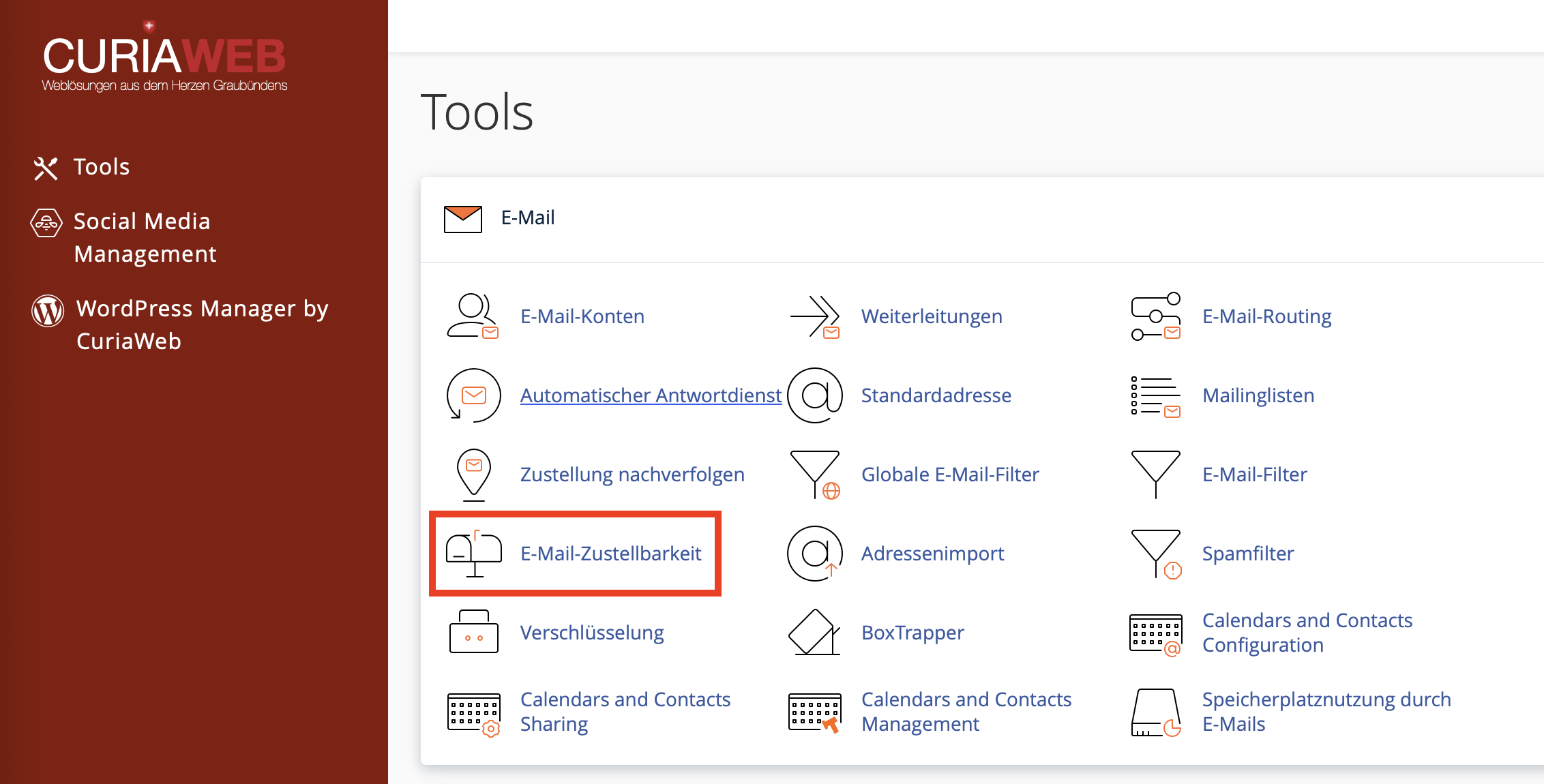
First, log into your CURIAWEB client area or directly into cPanel. Then, navigate to the Email section and select the Email Deliverability feature.
In the overview table, cPanel displays your domains alongside their respective deliverability status. This shows you whether your DNS configuration is valid or if action is required.
- Log into cPanel.
- Open the Email section.
- Click on Email Deliverability.
- Check the status of your domain.
- If necessary, click on Repair or Manage.
Checking Status: Repair or Manage
In the deliverability overview, cPanel indicates whether everything is correctly configured for a domain or if anomalies were detected. Depending on the situation, different actions are available.
| Action | Meaning | Important to Know |
|---|---|---|
| Repair | cPanel attempts to automatically fix missing or incorrect DNS records. | This only works if the DNS zone is hosted directly on the cPanel server. |
| Manage | Displays the required DKIM, SPF, and other technical values. | Useful when DNS is managed externally and records must be copied manually. |
If CURIAWEB Manages Your Nameservers
If your domain points to CURIAWEB nameservers and the DNS zone is managed within cPanel, cPanel can resolve many deliverability issues automatically. In this scenario, simply click Repair within the Email Deliverability interface.
cPanel will then create or correct the necessary DNS records as far as technically possible. Afterward, re-check the status. Please keep in mind that DNS changes may take some time to propagate globally depending on the environment.
If You Use External Nameservers
If your domain uses external nameservers—for instance, Cloudflare, another registrar, or an external DNS provider—cPanel cannot deploy DNS records automatically. In this case, you must manually enter the displayed values with your respective DNS provider.
Pay close attention to the following points when copying:
- The name or host of the DNS record must be adopted exactly.
- The value of the TXT record must not be cut off.
- DKIM keys can be very long strings; ensure they are saved completely.
- Do not accidentally create a duplicate secondary SPF record.
- After updating, expect a brief propagation window before changes go live worldwide.
Expanding SPF Records for External Mailing Services
If you use third-party tools to send emails on your behalf, these services must be included in your SPF record. This applies to email marketing platforms, CRM software, accounting tools, shop platforms, ticket systems, or marketing automation software.
Examples include newsletter systems or transactional mail applications. You can obtain the precise SPF string specifications directly from the vendor.
- Click Manage next to your domain inside cPanel.
- Scroll down to the SPF block.
- Click Customize, if this option is available.
- Add the include statement provided by the external vendor.
- Save your changes or install the modified SPF record.
- Re-evaluate your email deliverability status.
Typical Delivery Problems and Their Root Causes
| Problem | Possible Cause | Solution |
|---|---|---|
| Emails land in spam | SPF, DKIM, or domain reputation is suboptimal | Run Email Deliverability checks and correct DNS entries |
| Newsletters are not delivered | Third-party mail service is not included in SPF | Expand the SPF record according to provider guidelines |
| DKIM is shown as invalid | DNS record is missing, wrong, or incompletely copied | View the DKIM value in cPanel and paste it accurately into DNS |
| SPF error despite existing record | Multiple individual SPF records or incorrect syntax | Consolidate your SPF parameters into a single TXT record |
| PTR error is displayed | Reverse DNS is not configured correctly | Contact CURIAWEB Support, as PTR is usually managed server-side |
Best Practices for Healthy Email Deliverability
Technical DNS adjustments form the bedrock of good deliverability. In addition, you should maintain clean sending habits, especially when handling business correspondence or higher mail volumes.
Recommended Steps:
- Ensure SPF and DKIM are fully set up for every domain that sends mail.
- Only include external delivery services in your SPF record that you actually use.
- Never deploy multiple independent SPF records.
- Copy DNS entries identically when using external nameservers.
- Have PTR errors verified and resolved by support.
- Avoid sending mass marketing emails from standard personal accounts.
- Use professional newsletter platforms with correct authentication signatures.
- Monitor and analyze bounce notifications and error messages seriously.
Distinction from Email Routing and Spam Filters
The Email Deliverability feature primarily targets outgoing mail validation and whether other servers view your infrastructure as authentic. It is completely distinct from Email Routing, which determines where inbound mail for your domain is sent.
Similarly, spam filters perform a different task. They scan arriving inbound messages for spam patterns. SPF, DKIM, and PTR, conversely, operate to secure the validity and architectural legitimacy of your outbound mail footprint.
| Feature | Primary Task |
|---|---|
| Email Deliverability | Improves the technical trustworthiness of outgoing emails. |
| Email Routing | Controls whether emails are delivered locally or to external destinations. |
| Spam Filters | Evaluates incoming mail streams and reduces unsolicited messages. |
When to Contact Support
Many SPF and DKIM complications can be managed straight from cPanel or your DNS dashboard. However, professional support verification becomes necessary if errors remain ambiguous or third-party DNS nodes confuse the setup.
Please contact CURIAWEB Support immediately if:
- cPanel triggers a persistent PTR or Reverse DNS exception error.
- Your emails are consistently rejected by several prominent recipients.
- You operate external nameservers and need help cross-checking target values.
- You want to seamlessly integrate Microsoft 365, Google Workspace, or complex CRM configurations.
- You need an deep-dive analysis of email header structures or bounce tracking.
Summary
The cPanel Email Deliverability tool enables you to double-check vital system elements ensuring reliable email distribution. SPF authorizes specific servers, DKIM digitally stamps your mail, and PTR / Reverse DNS handles IP mapping consistency validations.
If you use CURIAWEB nameservers, cPanel can instantly patch up many missing fields via automated scripts. With external setups, manual transfers are necessary. Ensure you keep your external application integrations (like newsletters or CRMs) aligned inside a consolidated SPF string.
Taking care of these parameters drastically ensures your mail footprint successfully moves directly into targeted mailboxes without turning into collateral spam folder damage.
Are your emails bouncing back or getting caught in spam folders?
CURIAWEB Support is here to audit your DNS records, SPF/DKIM parameters, PTR status, and error logs to fully optimize your outbound deliverability layout.
Tip: Always rerun the Email Deliverability verification tool in cPanel after making DNS changes. External DNS entries must match cPanel's instructions flawlessly.
