


Compact Statistics at a Glance
Webalizer is a highly efficient analysis software that transforms your server log files into easy-to-read charts. It is particularly known for its speed and provides precise data on hits, visits, and the technical origin of your users.
Quick Check: Use Webalizer if you want to know which pages visitors use to enter your website and where they leave most frequently, without long loading times.
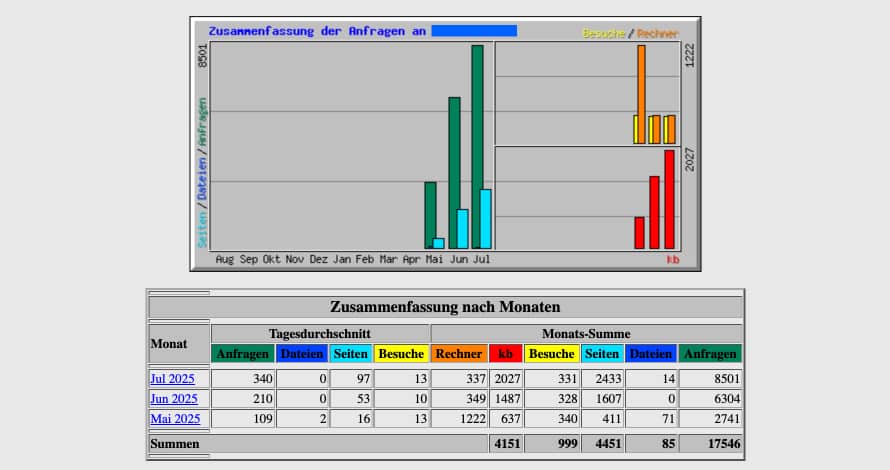
How to Use Webalizer
- Log in to cPanel.
- In the Metrics section, click on Webalizer.
- Select the desired domain by clicking View.
- Click on a specific month to open the detailed view.
Key Metrics Explained
In the monthly reports, you will find specialized tables that help you better understand user behavior:
Entry & Exit
Find out which URLs are the "front door" of your website and at which point visitors lose interest (exit pages).
Find out which URLs are the "front door" of your website and at which point visitors lose interest (exit pages).
Referrers
See exactly which external websites or search engines have linked to you.
See exactly which external websites or search engines have linked to you.
Agents (Browsers)
Webalizer lists the browsers used (Chrome, Firefox, Edge, etc.) so you can optimize your site's display.
Webalizer lists the browsers used (Chrome, Firefox, Edge, etc.) so you can optimize your site's display.
Countries
Analysis of origin based on the top-level domain (e.g., .ch, .de, or .com).
Analysis of origin based on the top-level domain (e.g., .ch, .de, or .com).
Specific Features of the Display
- Hourly Statistics: Perfect for identifying peak loads on the server.
- Top 30 URLs: Shows you your most popular content (pages, images, or downloads).
- Unresolved/Unknown: These are accesses via IP addresses that could not be clearly assigned to a country or provider.
For even more in-depth graphical processing, we also recommend taking a look at AWStats.
