


Benutzermanager in cPanel: E-Mail, FTP und Webdisk zentral verwalten
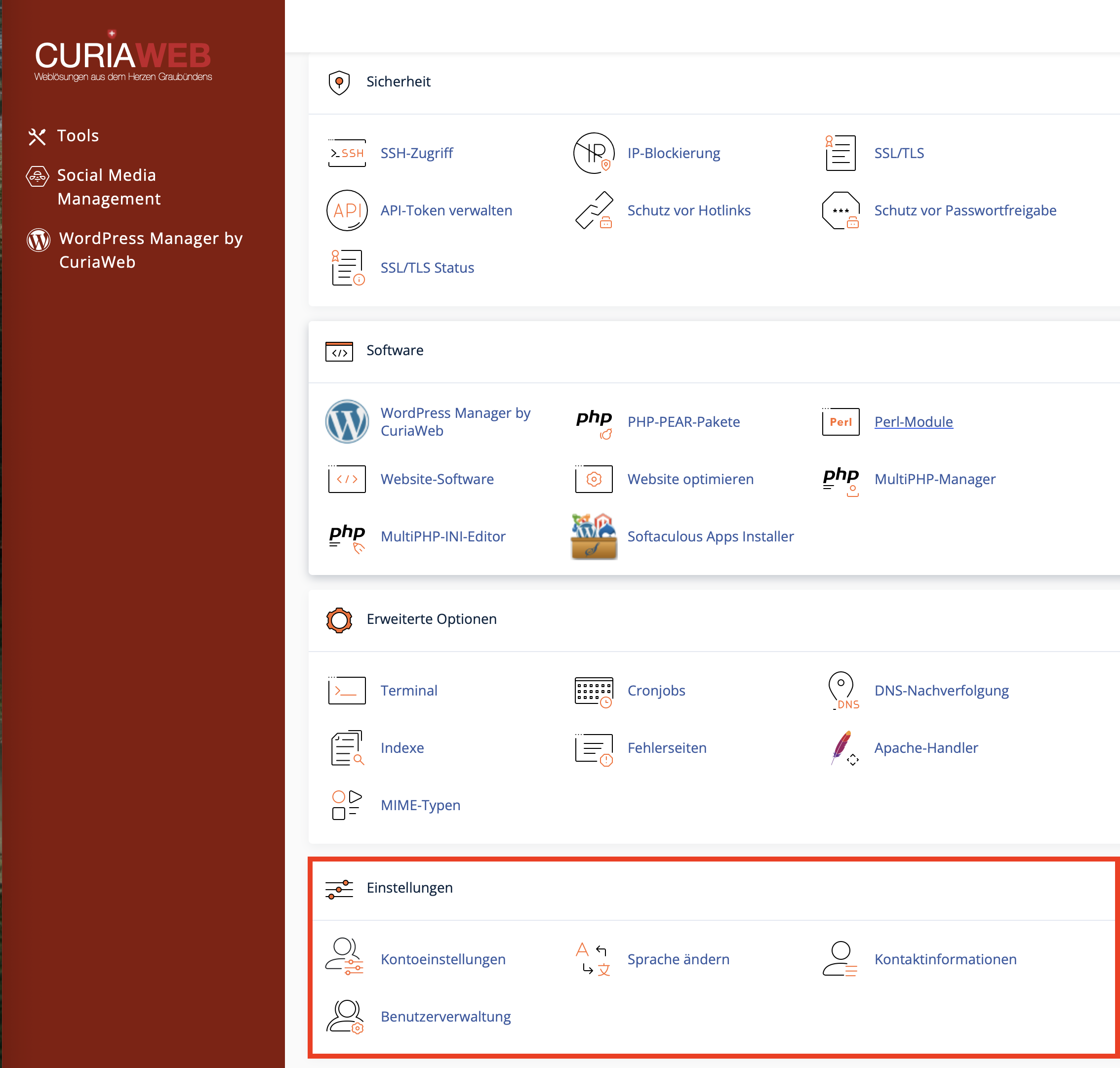
Mit dem Benutzermanager in cPanel verwalten Sie zusätzliche Benutzerkonten für bestimmte Dienste Ihres Hosting-Kontos. So können Sie zum Beispiel einem Mitarbeiter, Entwickler oder Projektpartner Zugriff auf E-Mail, FTP oder Webdisk geben, ohne den vollständigen cPanel-Hauptzugang weiterzugeben.
Der Benutzermanager eignet sich besonders dann, wenn Sie einzelne Zugänge übersichtlich verwalten, bestehende Dienstkonten verknüpfen oder Berechtigungen gezielt einschränken möchten.
Wann ist der Benutzermanager sinnvoll?
Der Benutzermanager ist hilfreich, wenn mehrere Personen oder Anwendungen Zugriff auf einzelne Dienste benötigen, aber nicht auf das gesamte Hosting-Konto zugreifen sollen.
- Mitarbeiter: Ein Mitarbeiter benötigt ein eigenes E-Mail-Postfach.
- Webentwickler: Ein Entwickler soll per FTP nur auf ein bestimmtes Projektverzeichnis zugreifen.
- Projektpartner: Ein externer Partner soll Dateien über Webdisk hochladen oder abrufen.
- Organisation: Bestehende E-Mail-, FTP- oder Webdisk-Konten sollen übersichtlicher zusammengeführt werden.
Neuen Benutzer beziehungsweise Subaccount anlegen
Um einen neuen Benutzer zu erstellen, öffnen Sie in cPanel den Bereich Benutzermanager und klicken Sie auf Benutzer hinzufügen. Anschliessend tragen Sie die erforderlichen Angaben ein und legen fest, welche Dienste aktiviert werden sollen.
| Bereich | Beschreibung |
|---|---|
| Identität | Tragen Sie Name, Benutzername und die gewünschte Domain ein. Achten Sie darauf, bei mehreren Domains die richtige Domain auszuwählen. |
| Kontakt-E-Mail | Diese Adresse wird unter anderem für Passwort-Informationen oder Zurücksetzen-Funktionen verwendet. Verwenden Sie eine erreichbare und aktuelle E-Mail-Adresse. |
| Sicherheit | Sie können ein sicheres Passwort vergeben oder den Benutzer zur eigenen Passworterstellung einladen, sofern diese Option verfügbar ist. |
| Dienste | Aktivieren Sie nur die Dienste, die der Benutzer tatsächlich benötigt, zum Beispiel E-Mail, FTP oder Webdisk. |
Dienste im Benutzermanager konfigurieren
Für jeden Subaccount können Sie festlegen, welche Dienste verfügbar sein sollen. Dadurch behalten Sie die Kontrolle über Zugriff, Speicherplatz und Verzeichnisse.
Erstellt oder verwaltet ein E-Mail-Postfach für den Benutzer. Sie können je nach cPanel-Konfiguration ein Speicherkontingent festlegen und den Zugriff über Webmail ermöglichen.
Ermöglicht Dateiübertragungen per FTP. Der Zugriff kann auf ein bestimmtes Verzeichnis beschränkt werden, zum Beispiel
/public_html/projekt1.Ermöglicht den Zugriff auf Dateien über Webdisk. Je nach Einstellung kann der Benutzer Dateien lesen, hochladen, ändern oder nur anzeigen.
E-Mail-Zugriff einrichten
Wenn Sie den Dienst E-Mail aktivieren, wird für den Benutzer ein E-Mail-Postfach angelegt oder mit einem bestehenden Konto verbunden. Der Benutzer kann dieses Postfach anschliessend über Webmail oder über ein E-Mail-Programm nutzen.
- Postfachname: ergibt sich aus Benutzername und Domain, zum Beispiel
max@ihredomain.ch. - Speicherplatz: kann je nach Einstellung begrenzt oder flexibel konfiguriert werden.
- Passwort: sollte stark und nur dem jeweiligen Benutzer bekannt sein.
- Webmail: ermöglicht Zugriff auf E-Mails direkt im Browser.
FTP-Zugriff auf ein Verzeichnis beschränken
FTP-Zugänge sollten möglichst nur auf das Verzeichnis beschränkt werden, das der jeweilige Benutzer tatsächlich benötigt. So verhindern Sie, dass ein externer Entwickler oder Partner unbeabsichtigt auf andere Websites oder sensible Dateien zugreifen kann.
/public_html/projekt1 begrenzen. Dadurch sieht der Benutzer nicht automatisch alle Dateien Ihres Hosting-Kontos.Achten Sie bei FTP-Zugängen besonders auf sichere Passwörter und löschen Sie nicht mehr benötigte Zugänge nach Abschluss eines Projekts wieder.
Webdisk-Zugriff einrichten
Mit Webdisk können Dateien ähnlich wie bei einem Netzlaufwerk verwaltet werden. Je nach Betriebssystem und cPanel-Konfiguration kann der Zugriff über eine Webdisk-Adresse oder eine Einbindung im Dateimanager des Betriebssystems erfolgen.
Beim Webdisk-Zugriff können Sie festlegen, ob der Benutzer Dateien nur lesen oder auch schreiben darf:
- Lese-/Schreibzugriff: Der Benutzer kann Dateien anzeigen, hochladen, ändern und löschen.
- Nur Lesen: Der Benutzer kann Dateien anzeigen oder herunterladen, aber keine Änderungen vornehmen.
Bestehende Konten verknüpfen
Wenn bereits ein E-Mail-Konto, FTP-Konto oder Webdisk-Konto mit demselben Namen existiert, kann cPanel diese Konten im Benutzermanager erkennen und eine Verknüpfung anbieten. Dadurch lassen sich mehrere Dienste übersichtlich einem Subaccount zuordnen.
Das ist besonders praktisch, wenn Konten ursprünglich separat angelegt wurden und später zentral verwaltet werden sollen.
Login-Daten und Zugriffswege für Subaccounts
Die Anmeldung erfolgt je nach aktiviertem Dienst unterschiedlich. Der Benutzermanager erstellt keinen vollständigen cPanel-Login, sondern Zugriff auf die jeweils freigegebenen Dienste.
| Dienst | Typischer Zugriff | Hinweis |
|---|---|---|
| Webmail | https://ihredomain.ch:2096 |
Anmeldung mit vollständiger E-Mail-Adresse und Passwort. |
| FTP | FTP-Programm wie FileZilla, Cyberduck oder WinSCP | Anmeldung mit FTP-Benutzername, Passwort und Serveradresse. |
| Webdisk | Webdisk-Adresse oder Betriebssystem-Einbindung | Je nach Konfiguration kann Port 2078 für sicheren Webdisk-Zugriff verwendet werden. |
Bestehende Benutzer bearbeiten oder löschen
Im Benutzermanager sehen Sie eine Übersicht der vorhandenen Benutzer und der aktivierten Dienste. Dort können Sie bestehende Konten bearbeiten, Passwörter ändern, Dienste aktivieren oder deaktivieren und nicht mehr benötigte Benutzer entfernen.
- Benutzer bearbeiten: Name, Kontaktadresse, Passwort und Dienste anpassen.
- Dienste deaktivieren: Zugriff auf E-Mail, FTP oder Webdisk einzeln entfernen.
- Benutzer löschen: Nicht mehr benötigte Subaccounts entfernen.
- Zugriffe regelmässig prüfen: Besonders nach Projektende oder Mitarbeiterwechsel sinnvoll.
Sicherheitsempfehlungen für Subaccounts
- Erstellen Sie für jede Person einen eigenen Benutzer statt gemeinsame Zugangsdaten zu verwenden.
- Aktivieren Sie nur die Dienste, die wirklich benötigt werden.
- Beschränken Sie FTP-Zugriffe auf das notwendige Verzeichnis.
- Verwenden Sie starke, einzigartige Passwörter.
- Entfernen Sie Zugänge nach Abschluss eines Projekts oder bei Mitarbeiterwechsel.
- Geben Sie den cPanel-Hauptzugang nicht weiter, wenn ein Subaccount ausreicht.
Zusammenfassung
Der Benutzermanager in cPanel hilft Ihnen dabei, E-Mail-, FTP- und Webdisk-Zugänge zentral zu verwalten. Sie können Subaccounts erstellen, Dienste gezielt aktivieren und Zugriffsrechte besser kontrollieren, ohne den vollständigen cPanel-Hauptzugang weiterzugeben.
Besonders für Mitarbeiter, Entwickler und externe Partner ist der Benutzermanager eine praktische und sicherere Möglichkeit, genau den Zugriff bereitzustellen, der für die jeweilige Aufgabe benötigt wird.
Benötigen Sie Unterstützung beim Einrichten eines FTP-Zugangs, Webmail-Kontos oder Webdisk-Benutzers?
Das CURIAWEB-Technikteam hilft Ihnen gerne bei der sicheren Einrichtung Ihrer cPanel-Benutzer.
