


Calendar and Contact Management: Create Your Own Address Books & Task Lists
With the calendar and contact management in cPanel or Webmail, you can organize your digital resources centrally. You can create custom calendars, address books, and task lists, edit existing collections, and remove entries that are no longer needed.
This function is particularly helpful if you want to manage business appointments, customer contacts, project tasks, or internal organizational data in a structured manner. Instead of gathering all information into a single default list, you can set up separate areas for different purposes.
Briefly explained:
The calendar and contact management handles so-called collections. These include calendars, address books, and task lists. Depending on its type, each collection can be used for appointments, contacts, or tasks.
What is calendar and contact management suitable for?
Calendar and contact management is your central workspace for organizational data related to your email account. It allows you to cleanly separate and specifically structure different workspaces.
Typical use cases include:
- Separate calendars: For example, for business appointments, personal events, project planning, or absences.
- Custom address books: For example, for customers, suppliers, association members, partners, or internal contacts.
- Task lists: For example, for to-dos, project tasks, reminders, or recurring administrative tasks.
- Better overview: Different collections help to logically separate data and find it more quickly.
- Preparation for synchronization: Depending on the device and application, collections can be used via CalDAV or CardDAV.
What types of collections are available?
The system distinguishes between three basic collection types. Each type serves a different purpose and should be used accordingly.
Calendars
For appointments, events, deadlines, and scheduling
Address Books
For contacts, customers, partners, and internal addresses
Task Lists
For to-dos, tasks, projects, and organizational work
Calendar, Address Book, or Task List: What is the difference?
To keep your data clearly arranged, you should select the matching collection type. A calendar is not meant for contacts, an address book is not for appointments, and a task list is not intended for complete customer records.
| Collection Type | Usage | Examples |
|---|---|---|
| Calendar | Management of appointments and events | Meetings, deadlines, vacations, project timelines |
| Address Book | Management of contact details | Customers, suppliers, team contacts, association members |
| Task List | Management of tasks and to-dos | Project tasks, internal assignments, open items |
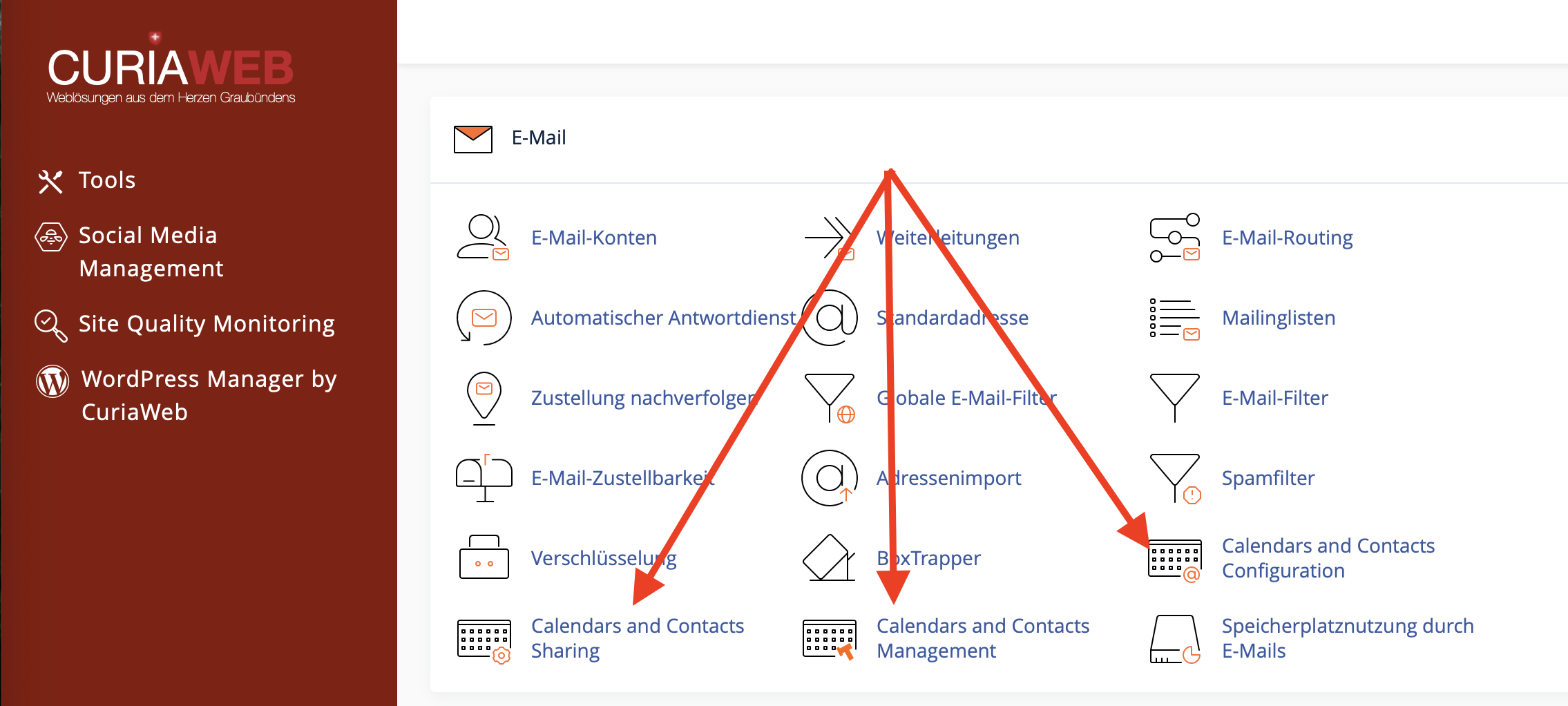
Where can you find the calendar and contact management?
Depending on your hosting and webmail interface, the management area can be accessed either via cPanel or via the Webmail interface. To do so, log in with the relevant email account and open the section for calendars, contacts, or the corresponding collections.
Tip:
Changes made to calendars, address books, or task lists can also become visible on connected devices through synchronization, depending on the device and program used.
Overview of existing collections
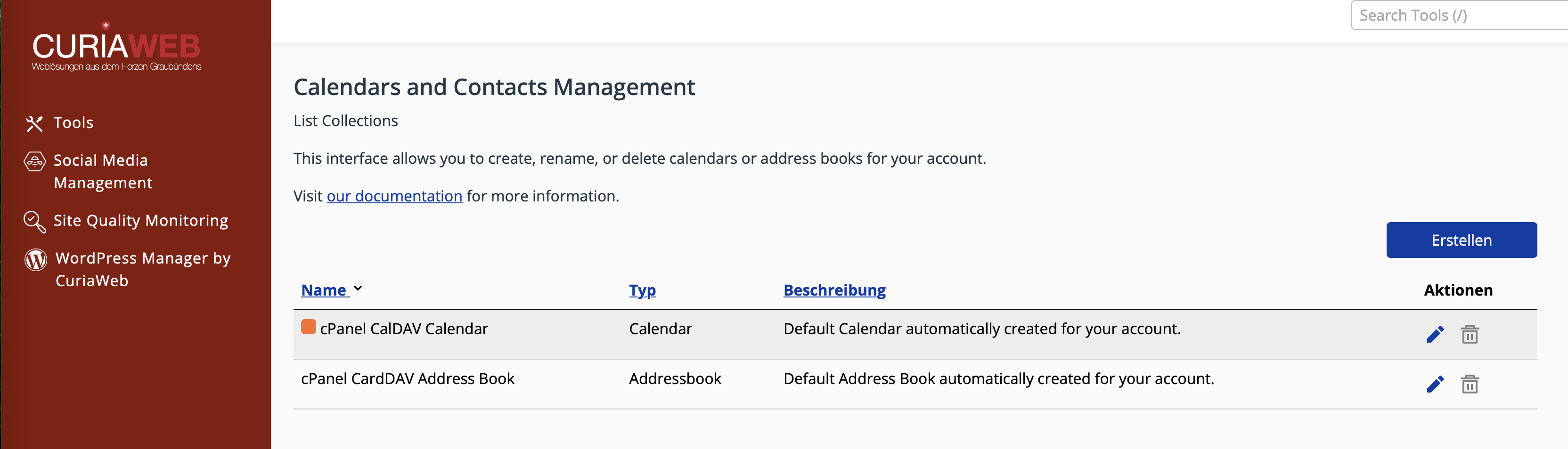
In the calendar and contact management area, you will see an overview of the existing collections. This lists available calendars, address books, and task lists. You can use the action icons to edit existing entries or, if permitted, delete them.
Create a new collection
If you wish to create an additional calendar, a custom address book, or a task list, use the "Create" button. Afterwards, choose the desired collection type and assign a suitable name.
Step-by-step: Create a new collection
- Click on "Create".
- Select the desired collection type: Calendar, Address Book, or Task List.
- Provide a meaningful name.
- If necessary, add a description or other available details.
- For calendars: Select a color if this option is provided.
- Click on "Save" to set up the collection.
Meaningful names for calendars, address books, and task lists
Clear naming is important so that you can quickly recognize what a collection is intended for later on. Distinct names prevent confusion, especially when handling multiple calendars or contact lists.
| Area | Good examples | Less suitable |
|---|---|---|
| Calendar | Team Calendar, Vacation Planning, Project A, Meeting Room | New, Calendar 2, Test |
| Address Book | Customer Contacts, Suppliers, Board Members, Support Contacts | List, Old Contacts, Miscellaneous |
| Task List | Project Tasks, Open Items, Monthly Closing, Website Maintenance | Todo, Tasks 1, Unclear |
Select a calendar color
For calendars, assigning a color can be helpful to better distinguish appointments visually. If you use multiple calendars, you can quickly identify which area an appointment belongs to in supported calendar applications.
Examples of a sensible color separation:
- Red: Important deadlines or urgent appointments
- Black or Gray: Internal appointments or general planning
- Other available colors: Project calendars, vacation planning, or resources
The actually available colors depend on the respective interface and application. Choose colors as consistently as possible so that your calendar structure remains comprehensible in the long term.
Edit existing collections
You can edit existing calendars, address books, or task lists in the overview by clicking the pencil icon. Depending on the collection type, you can adjust details such as the name, description, or color.
Editing is particularly useful if the purpose of a collection changes or if an ambiguous name needs to be specified.
Typical adjustments:
- Change name: For example, from Calendar 2 to Sales Team Calendar.
- Add description: To clarify the purpose of the collection.
- Change color: For a better visual distinction of calendars.
Delete collections
Collections that are no longer required can be deleted using the trash can icon, provided that the respective collection is deletable. Proceed with care, as deleting a collection can also affect the data contained within it.
Important Note:
Every email account has a default calendar and a default address book. These are required by the system and cannot be deleted.
Before deleting a collection, check whether the included appointments, contacts, or tasks are still required. For important data, a backup or export is recommended before deletion, provided your interface offers this feature.
Default Calendar and Default Address Book
As a rule, a default calendar and a default address book exist for every email account. These basic collections are intended for the normal use of calendar and contact data and can therefore not be removed.
You can create additional custom collections to organize specific areas separately. This keeps the default area intact while special calendars or contact lists are handled independently.
Examples of a sensible structure
A good structure saves time and facilitates collaboration. Especially for business operations, it is worth building calendars, address books, and task lists deliberately.
| Goal | Recommended Collection | Benefit |
|---|---|---|
| Organize team schedules | Team Calendar | Shared overview of meetings and deadlines |
| Separate customer contacts | Customer Contacts Address Book | Quicker access to business contacts |
| Structure project work | Task List: [Project Name] | Clearly assign open items and tasks |
| Plan absences | Vacation or Absence Calendar | Better overview for internal planning |
Synchronization with devices and programs
Calendars and address books can be synchronized with devices and programs, depending on the configuration. CalDAV is usually used for calendars, and CardDAV for contacts. Task lists may be handled differently depending on the application and its level of support.
If you want to use calendars or contacts on iPhone, iPad, Mac, Thunderbird, or other programs, use the server details from the calendar and contact configuration of your Webmail.
Note:
Not every external application displays all collection types identically. Therefore, after configuration, check whether the desired collection is visible in the respective program and synchronizes correctly.
Collections and teamwork
Custom calendars and address books can form an important basis for teamwork. If multiple people require access, collections can be shared with other email accounts within the same cPanel account, depending on the feature set.
It is best to plan the structure before sharing. A cleanly named team calendar or a clearly designated contact list is easier to manage later and reduces queries.
Best Practices for calendars, contacts, and task lists
With thought-out organization, you avoid duplicate data, ambiguous responsibilities, and unnecessary searching.
- Use clear names: Name collections in such a way that their purpose is immediately recognizable.
- Do not create too many collections: Having too many calendars or address books can make it harder to maintain an overview.
- Do not misuse default collections: Use additional collections for special projects or teams instead.
- Clean up regularly: Delete or archive lists that are no longer needed, if possible.
- Verify before deleting: Make sure that no important appointments, contacts, or tasks are lost.
- Establish a uniform structure in the team: Define which calendars and address books are used for what.
Common problems and solutions
The new collection is not displayed on my device:
Refresh the synchronization in your calendar or contacts app. Also, check whether the respective application supports this collection type.
I cannot delete the default calendar or the default address book:
This is normal. The default calendar and default address book are system-relevant core collections and cannot be removed.
I cannot find the option to create a collection:
Check whether you are in the correct area of the calendar and contact management. Depending on the interface, the wording may slightly differ.
Calendar colors are displayed differently in an app:
Some applications do not adopt colors exactly or apply their own styling. The crucial factor is that the collection synchronizes correctly.
A task list does not appear in my external program:
Not every application supports task lists in the same way. Check whether your program can display tasks or to-dos from the environment you are using.
Summary
Calendar and contact management helps you organize appointments, contacts, and tasks in a structured manner. You can create custom calendars, address books, and task lists, edit existing collections, and remove entries that are no longer needed.
Especially for business use, a clear structure with distinct names and deliberately separated collections pays off. This ensures you keep track of appointments, contacts, and tasks, establishing a solid foundation for synchronization and teamwork.
Do you need help with calendars, contacts, or task lists?
CURIAWEB support is happy to assist you if you want to create, manage, or prepare collections for use on your devices.
Create Support Ticket