


Secure collaboration in the CURIAWEB Client Area without sharing your password
When several people work on your website, domains or hosting services, access management quickly becomes important. You may want your web designer to manage technical settings, an internal employee to open support tickets or your accounting department to view invoices. At the same time, you probably do not want to share your personal main password or give every person access to all areas of your CURIAWEB account.
This is exactly what the user management feature in the CURIAWEB Client Area is designed for. You can invite additional users to your account and assign individual permissions. This allows you to stay in full control of who can view or manage which areas. It is safer, clearer and more professional than sharing your own login details.
Why you should not share your password
Sharing a password is not recommended for security reasons. Once several people use the same login, it becomes difficult to track who made which change. In addition, the other person may gain access to all areas of your account, including invoices, payment information, customer data, domains, hosting products and support tickets.
With a separate user account, you avoid this risk. Each invited person uses their own login and only receives the permissions they actually need. Your own main password remains private, and you can change or completely revoke access at any time.
Typical use cases for additional users
User management is especially useful when you work with external service providers or several people within your company. For example, you can give a web designer access to technical areas without allowing that person to view your invoices or payment details.
- A web designer needs to check hosting or domain settings.
- An agency needs to open support tickets for technical questions.
- An employee should manage specific products.
- Your accounting department should view and download invoices.
- An administrator should manage domains, DNS or hosting services.
- An external technician should receive temporary access only.
By assigning individual permissions, you ensure that each person can only access the areas needed for their task.
How to add a new user in the CURIAWEB Client Area
To give another person access to your CURIAWEB account, invite them through user management. The invited person will receive an email invitation and can then use their own login.
- Log in to the CURIAWEB Client Area with your main account.
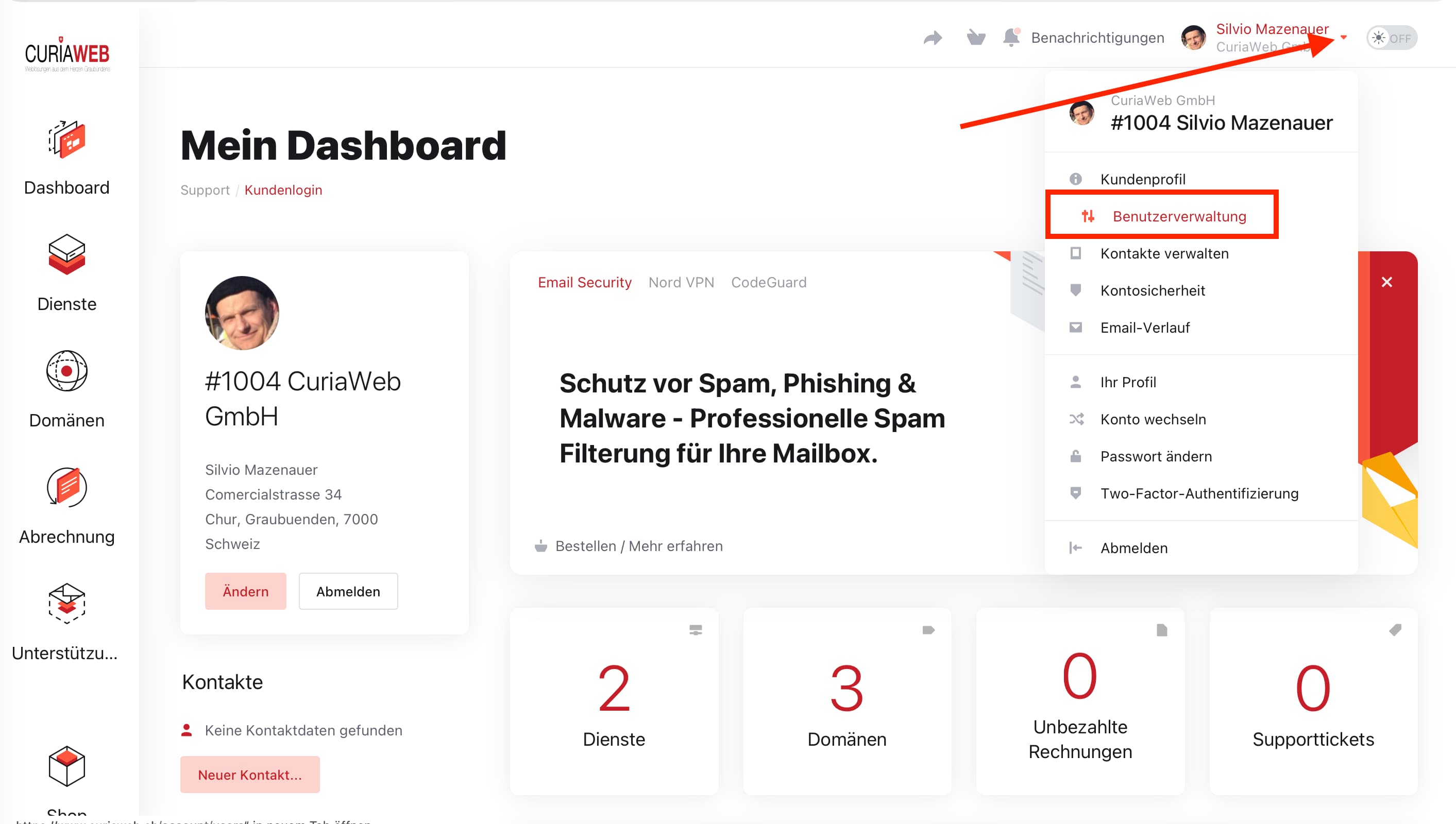
- Click the profile or user menu in the top right corner.
- Open “User Management”.
- Enter the email address of the person you want to invite.
- Select “Customize Permissions” to define access rights individually.
- Choose which areas the person may view or manage.
- Click “Send Invitation”.
The invited person will then receive an email with the next steps. Access is only possible once the invitation has been accepted.
Which permissions can be assigned?
Depending on your needs, you can decide whether an additional user may perform only certain tasks or receive broader access. The available permissions may vary depending on the Client Area version and account type, but areas such as support, domains, products, invoices and account management can typically be controlled separately.
Examples of possible permissions include:
- View or create support tickets
- Manage domains
- View hosting products and services
- Check technical settings
- View or download invoices
- Manage payments and orders
- Manage contacts or users
For external service providers, it is usually best to grant only the technical permissions that are actually required. For accounting purposes, invoice access may be sufficient without granting access to technical settings.
Recommendation: grant permissions based on the least privilege principle
When assigning user permissions, we recommend following the least privilege principle. This means that a person should only receive the permissions necessary for their specific task. If your web designer only needs to create support tickets or view technical information, they do not need access to invoices or payment data.
This approach improves the security of your CURIAWEB account and reduces the risk of unintended changes. At the same time, collaboration remains efficient because each person receives exactly the tools they need.
Changing or removing access later
When a collaboration ends or a person takes on different tasks, you can review and adjust permissions at any time. To do this, open user management again in the CURIAWEB Client Area. There you can see which people currently have access to your account.
You can change existing permissions or remove access completely. This is especially important when external service providers only worked on your website temporarily or when an employee leaves the company.
Frequently asked questions about user management
Do I need to give my web designer my password?
No. You can invite your web designer as an additional user and assign only the permissions they need. Your own password remains private.
Can an additional user see my invoices?
Only if you grant the relevant permissions. You can control whether a person may view invoices through the permission settings.
Can I revoke access later?
Yes. You can change user permissions or remove access completely at any time.
Is a separate user account safer than sharing a password?
Yes. Each user has their own login, and you remain in control of the assigned permissions. This makes collaboration safer and easier to track.
Summary
With user management in the CURIAWEB Client Area, you can collaborate securely with web designers, agencies, employees or your accounting department without sharing your main password. You decide individually who may access support, domains, hosting products, invoices or other areas.
This keeps your CURIAWEB account protected while allowing internal and external users to work efficiently on the tasks they need to complete. For secure collaboration, we recommend reviewing user permissions regularly and granting only the access that is actually required.
