


Share Calendars & Contacts: How to Share Resources with Your Team
With calendar and contact sharing in cPanel, you can share calendars and address books with other email accounts within the same cPanel account. This allows you to centrally manage appointments, team calendars, internal resources, or shared contact lists and make them accessible to multiple people.
This feature is particularly useful for companies, associations, medical practices, agencies, or teams that operate with multiple email addresses and want to use shared information efficiently. Instead of manually maintaining appointments or contacts multiple times, selected collections can be shared and assigned read or edit permissions as required.
Briefly explained:
A shared collection is a calendar or address book to which another email account is granted access. Depending on the permission level, this account can either only view the collection or additionally edit it.
When is calendar and contact sharing useful?
Shared calendars and contacts help to organize information consistently within a team. They prevent duplicate data entry and ensure that multiple people can access the same up-to-date data pool.
Typical areas of application include:
- Team calendars: Manage shared appointments, meetings, or internal deadlines.
- Room or resource scheduling: Maintain calendars for meeting rooms, company vehicles, or shared equipment.
- Vacation and absence planning: Coordinate absences for multiple employees clearly.
- Centralized contact lists: Collaboratively maintain customer contacts, suppliers, or association members.
- Department organization: Provide calendars and contacts for support, sales, administration, or project teams.
Important requirement: the same cPanel account
Sharing calendars and contacts is only possible between email accounts that are located within the same cPanel account. This means: both the owner of the collection and the recipient of the share must be email accounts in the exact same cPanel account.
Important requirement:
Sharing is only possible between email accounts residing on the same cPanel account. Therefore, you need at least two configured email addresses within the same hosting account to use this function effectively.
Example: If info@yourdomain.ch and support@yourdomain.ch are created in the same cPanel account, a calendar or address book can be shared between these accounts.
Difference between Owner and Recipient
When sharing, a distinction is made between the owner of a collection and the recipient of the share.
| Role | Meaning |
|---|---|
| Owner | The email account to which the calendar or address book belongs. |
| Collection | The specific calendar or address book that is to be shared. |
| Share Recipient | The email account that is to be granted access to the collection. |
| Permission | Determines whether the recipient is allowed to only read the collection or also edit it. |
What permissions are available?
When creating a share, you can specify whether another email account receives read-only access or is also allowed to edit the collection.
- Read only: The recipient can view appointments or contacts but cannot modify them.
- Allow Editing: The recipient can not only see entries but can also edit them.
Recommendation:
Only assign write permissions to individuals or accounts that actually need to maintain entries. For pure viewing purposes, such as team calendars or resource overviews, read access is usually sufficient.
Step 1: Open the Calendar and Contacts section
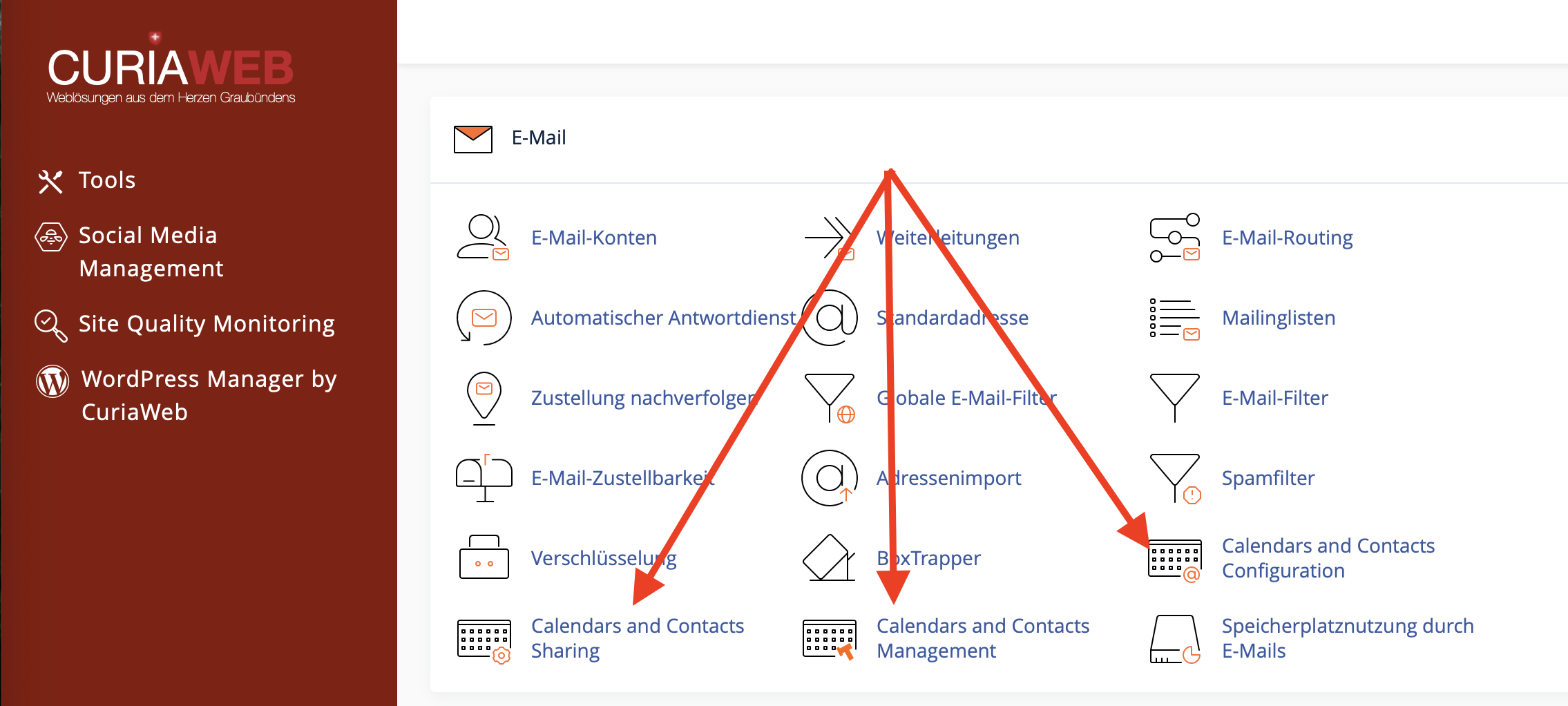
First, log into your cPanel. Then open the section for calendars and contacts or the feature for sharing collections.
The exact wording may vary slightly depending on the language and cPanel version. The relevant section is where calendar and contact collections can be managed and shared with other email accounts.
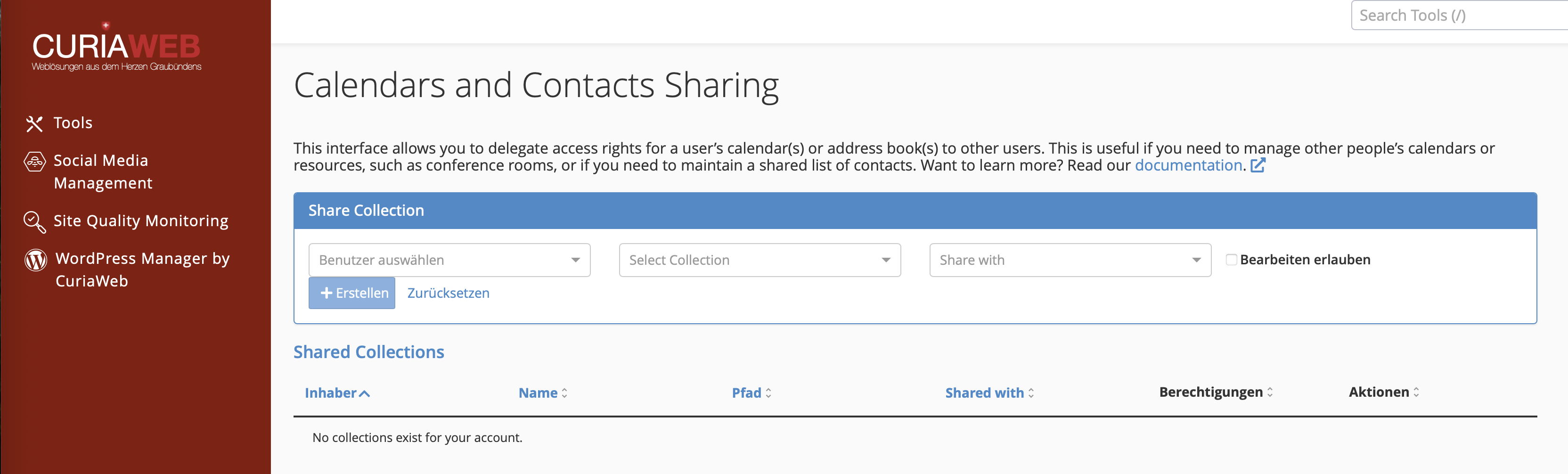
Step 2: Select the Owner of the collection
First, select the owner of the collection. This is the email account that currently owns the calendar or address book.
For example, if a shared calendar is maintained under team@yourdomain.ch, select this account as the owner.
Step 3: Select the Calendar or Address Book
In the next step, select the specific collection that you wish to share. This can be either a calendar or an address book.
Make sure to choose the correct collection. Clear naming is helpful, especially if there are multiple calendars or contact lists, for example, Team Calendar, Vacation Planning, Customer Contacts, or Meeting Room.
Step 4: Select the Share Recipient
Now select the email account that should receive access to the collection. This account must also be located within the same cPanel account.
Example: The calendar of team@yourdomain.ch can be shared with employee@yourdomain.ch, provided both accounts are set up within the same cPanel account.
Step 5: Set the Permission
Next, decide whether the recipient should only read the collection or be allowed to edit it as well. Enable "Allow Editing" if the recipient should be given write permissions. Leave this option disabled if only read access is desired.
This decision is important because write permissions directly affect the content of the collection. Anyone with editing permissions can change existing entries and, depending on the application, add new ones.
Step 6: Create the share
Once the owner, collection, recipient, and permission have been selected, click on "Create". The share will then be generated in cPanel and displayed in the overview of shared collections.
Sharing workflow:
- Select Owner: Choose the account that owns the calendar or address book.
- Select Collection: Choose the specific calendar or address book.
- Share with: Select the email account that should receive access.
- Set Permission: Activate write permissions or leave as read-only access.
- Create: Save the share configuration.
Managing Shared Collections
After creating a share, it will appear in the "Shared Collections" table. There you can see which calendars or address books are shared with which accounts and which permissions apply.
Through this overview, you can later adjust permissions or remove a share entirely.
| Action | Description | Typical Use |
|---|---|---|
| Allow Editing | Grants write permissions to the selected user retrospectively. | When a team member needs to actively maintain appointments or contacts. |
| Disallow Editing | Revokes write permissions. The user will then only be able to read the collection. | When modifications should be prevented but visibility should still be allowed. |
| Delete | Removes the share completely. | When an account no longer requires access to the collection. |
Read-Only Access or Editing Permissions: Which is better?
Whether read-only access or editing permissions make sense depends on the purpose of the share. For many team calendars, read access is sufficient. Write permissions should only be granted if multiple people must actively manage entries.
| Scenario | Recommended Permission |
|---|---|
| Team members should only view appointments | Read only |
| Multiple people need to enter or modify appointments | Allow editing |
| A central customer list should be collaboratively maintained | Allow editing, but only for responsible persons |
| The calendar for a meeting room should only be visible | Read only |
Note on Appointment Invitations
With shared calendars, it should be noted that appointment invitations cannot be managed identically by all users in every situation. In a shared calendar, you can only invite participants to an event if you are the creator of that specific entry.
Note on appointment invitations:
In a shared calendar, you can only invite participants to an event if you are the creator of the respective calendar entry.
Therefore, it makes sense for teams to establish clear rules: Who creates appointments? Who is allowed to modify entries? And which calendars are for information purposes only?
Shares in Webmail, Calendar Apps, and External Programs
Once a collection has been shared, it can become visible in webmail, calendar programs, or via CalDAV/CardDAV depending on the application used. The actual display depends on the respective app and its support for shared resources.
If a shared collection does not appear immediately, check the following points:
- Is the correct email account configured on the device?
- Has the synchronization been refreshed in the app?
- Does the application being used support shared calendars or address books?
- Was the share created within the same cPanel account?
- Is it read-only access, or were editing permissions granted?
Best Practices for Shared Calendars and Contacts
To ensure that collaboration works reliably, shares should be planned carefully and reviewed regularly.
- Use clear names: Name calendars and address books uniquely, for example, Sales Team Calendar or Support Customer Contacts.
- Grant permissions sparingly: Only give write permissions to people who truly need them.
- Review regularly: Remove shares for accounts that are no longer actively used.
- Define responsibilities: Establish who creates, edits, or deletes entries.
- Avoid duplicates: Use a single central contact list wherever possible instead of maintaining multiple versions in parallel.
- Back up before major changes: Export or back up important contacts before making extensive adjustments.
Data Privacy for Shared Contacts and Calendars
Calendars and contacts frequently contain confidential information. This includes customer details, private appointments, phone numbers, email addresses, internal notes, or business agreements. Therefore, shares should be assigned consciously and only to authorized accounts.
Particularly with centralized contact lists, check whether all recipients truly require the data contained within them. For calendars, it should also be clear whether confidential appointments are allowed to be visible to other users.
Security Tip:
Review shares regularly, especially after staff turnover, project completions, or changes in team structures.
Common Problems and Solutions
The desired email address does not appear as a recipient:
Check whether the email account exists within the same cPanel account. Sharing between different cPanel accounts is not supported through this feature.
The shared collection is not displayed for the recipient:
Refresh webmail or the calendar/contacts app being used. Additionally, verify whether the application supports shared collections.
The recipient can see entries but cannot edit them:
It is likely that only read access was granted. Enable the "Allow Editing" option in cPanel if write permissions are desired.
A user cannot create appointments with participants:
Please note that in shared calendars, appointment invitations can only be sent out by the creator of that specific entry.
Entries were accidentally modified or deleted:
Check who possesses editing permissions and reduce them if necessary. For sensitive calendars or contact lists, read-only access is often the safer choice.
Summary
With calendar and contact sharing in cPanel, you can share calendars and address books with other email accounts within the same cPanel account. This enables teams to efficiently share team calendars, resources, vacation schedules, or central contact lists.
It is important to assign permissions intentionally: read access is suitable for pure informational purposes, while write permissions are designed for active collaboration. Review shares regularly and remove access rights that are no longer required.
Do you need help with shared calendars or contacts?
CURIAWEB support is happy to assist you if you want to share and correctly configure calendars, contacts, or team resources in cPanel.
Create Support Ticket