

A domain transfer – meaning the change of the domain provider or registrar – seems more technical and risky at first glance than it actually is. Many companies fear that during the transfer the website might suddenly become unreachable or emails might no longer arrive.
The good news: A cleanly prepared domain transfer is in most cases possible without any downtime of website and email. What is crucial is not so much the actual transfer as the correct handling of DNS, nameservers, and existing email settings.
In this guide, we show step by step what you should pay attention to during a domain transfer, which preparations are necessary, and which typical errors can lead to unnecessary downtime.
What is a domain transfer?
During a domain transfer, an existing domain moves from one registrar to another. The registrar is the provider where the domain is registered and managed.
Important: A domain transfer is not automatically a hosting change. Domain, website, and email are technically distinct components.
In the case of a pure domain transfer:
- does it remain persist on your own,
- does the change Domain name not,
- doesn't the website need to be migrated and
- the existing email system can also continue to run unchanged.
Initially, only the administrative management of the domain will be transferred.
Anyone who wants to transfer their domain to CURIAWEB will find the most important information on our page about Domain Transfer.
Why transfer a domain to another provider?
There can be various reasons for a domain transfer. Often, companies want to simplify their technical infrastructure or are no longer satisfied with their previous provider.
Typical reasons are:
- hard-to-reach or impersonal support
- confusing or increased prices
- Domain, hosting, and email are unnecessarily split across multiple providers
- missing or restricted DNS management
- a planned change of the hosting provider
A centralized administration can be particularly useful for SMEs and clubs/associations because it is clear who to contact in the event of technical problems.
Does a domain transfer cause downtime?
Usually not. The actual transfer of a domain does not automatically result in the website or email no longer working.
Problems usually arise when nameservers or DNS settings are changed at the same time and important entries are missing or incorrectly transferred.
Of particular concern are:
- missing A or AAAA records for the website
- incorrect or missing MX records for email
- unaccepted TXT records
- Changes to nameservers without a prepared DNS zone
- multiple simultaneous changes to domain, hosting, and email
DNS is the critical point in the domain transfer
The Domain Name System (DNS) determines which services can be reached under a domain. Put simply, DNS connects the domain name with websites, mail servers, and other services.
The most important DNS records include:
- A-Record: connects a domain with an IPv4 address
- AAAA Record: connects a domain to an IPv6 address
- MX Record: specifies the responsible mail servers
- CNAME: maps a hostname to another name
- TXT Record is used, among other things, for SPF, DKIM, and other verifications
If you want to know which DNS records are currently publicly registered for a domain before the transfer, you can use our DNS Checker use.
Zero-Downtime Domain Transfer: Step-by-Step Checklist
1. Document existing DNS settings
Before any changes are made, the existing DNS records should be fully documented. Records for websites, email, and external services are especially important.
2. Check which nameservers are used
A crucial point is the question of whether the previous nameservers will remain in place during the transfer or if they will also be changed.
If the previous name servers remain unchanged, nothing will initially change regarding the technical resolution of the domain. In the event of a name server change, however, the new DNS zone must already be correctly prepared.
Unlock domain for transfer
Depending on the domain extension, the domain must be unlocked for transfer by the current registrar. For some domains, there is also a so-called transfer lock.
4. Request auth code
An auth code is required for many domain extensions. This serves as proof of authorization for the transfer and is normally provided by the previous registrar.
The exact procedures vary depending on the domain extension. A .ch domain may therefore have different transfer conditions than, for example, a .com or .de domain.
5. Start transfer with the new registrar
Subsequently, the domain is specified with the new provider and the transfer is initiated with the required auth code.
6. Check DNS settings
After the transfer or a name server change, the most important DNS records should be checked again.
These include in particular:
- Website IP address
- MX records
- SPF
- DKIM
- DMARC
- Subdomains and external services
7. Test website and email
Upon completion, the website and email should be tested practically.
- Access the website via the domain
- test important subdomains
- Send test email to an external address
- Test email received from an external provider
Domain transfer and email: Special caution is required here
Email is one of those areas where errors in the DNS configuration become noticeable particularly quickly.
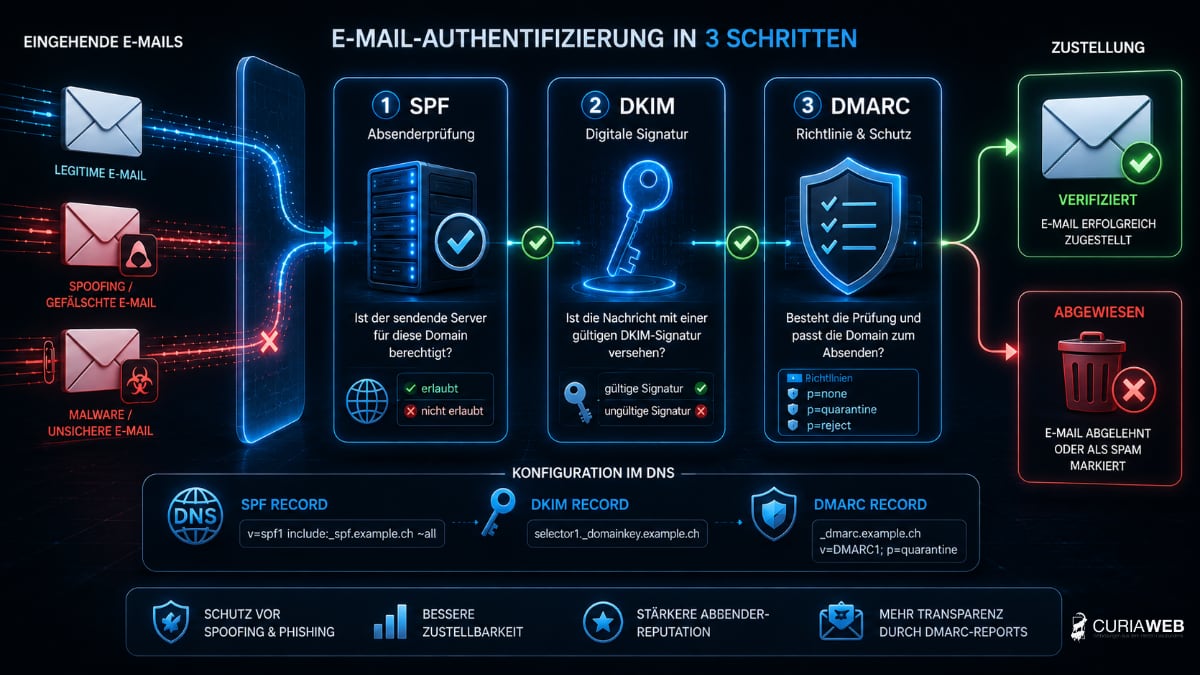
The MX records determine which servers accept emails for a domain. Additionally, SPF, DKIM, and DMARC play an important role in authentication and deliverability.
If these entries are forgotten or incorrectly transferred during the switch, messages cannot be delivered or will end up in the recipient's spam folder.
For more information on this topic, please see Email security and spam protection.
The most common mistakes during a domain transfer
Most problems can be avoided with good preparation. We see the following mistakes particularly often:
- DNS records are not backed up beforehand.
- MX records are forgotten when changing the nameserver.
- SPF, DKIM, or other TXT records are missing.
- Domain, hosting, and email are being changed simultaneously in an uncoordinated manner.
- The previous hosting account is being cancelled too early.
- The transfer will only be initiated immediately before the domain expires.
Particularly important: Do not cancel existing services until the new operation has been fully tested.
Domain transfer or complete hosting switch?
A domain transfer and a hosting change are two different processes. However, they can be sensibly combined with one another.
If website, databases, and email accounts are to be moved to a new provider alongside the domain, a coordinated migration is significantly safer than multiple independent changes.
Upon request, CURIAWEB handles the technical transfer when switching hosting providers. You can find information about the process at our free website migration service.
If you first want to register only a domain or manage existing domains centrally, you will find our offers in the area of Domains.
Conclusion: With good preparation, a domain transfer is risk-free
A domain transfer does not have to be complicated or lead to website or email downtime. The decisive factors are thorough preparation, control of the nameservers, and the complete takeover of all relevant DNS settings.
Especially with business domains, there should be no improvisation. Website, email, and DNS should be systematically checked before, during, and after the transfer.
Anyone who wants to transfer their domain and hosting to CURIAWEB does not have to carry out the technical transition alone. We assist with the planning and, upon request, also handle the migration of the website and email when switching hosting providers.