
Black Friday, Cyber Week, and the Christmas shopping season are among the most important sales periods of the year for many companies and online stores.
More visitors, more orders, and more inquiries are naturally welcome. However, it is precisely this peak load that can reveal weaknesses that are hardly noticeable in everyday operations.
A slow website, an overloaded online store, or checkout problems are especially annoying precisely when potential customers are already looking to buy.
The good news: You don't have to be a tech expert to prepare for it. With a few targeted checks, the risk can be significantly reduced.
This checklist shows what you before Black Friday, Christmas, and other high-sales promotions you should check on your website or online store.
Why Black Friday places special demands on websites
During normal operation, visitors and orders are usually distributed throughout the entire day. During a promotion, however, a large portion of the traffic can be concentrated into just a few hours.
A newsletter is sent out, a social media campaign launches, or an advertisement goes online—and suddenly, significantly more people are accessing the website at the same time.
Among other things, this increases:
- concurrent page views
- Database queries
- Shopping cart and checkout processes
- Form inquiries
- Transactional emails
- the required server resources
What works without any problems with 20 visitors does not automatically have to run just as stably with significantly higher simultaneous usage.
1. Check website speed in a timely manner
Nobody likes waiting for a slow website – especially not when shopping.
Long loading times can cause visitors to leave the website before they have even seen an offer or product.
Therefore, before undertaking any major action, the following points in particular should be checked:
- Are images unnecessarily large?
- Is the caching working correctly?
- Are there any unnecessary or slow plugins?
- Does the website still respond quickly even with multiple simultaneous accesses?
- Are sufficient resources available in the hosting?
A high-performance hosting environment forms the technical basis for this. You can find out more about our infrastructure and the available hosting offers at Web hosting with CURIAWEB.
2. Test online shop and checkout yourself
For an online shop, it is not enough to just visit the homepage and determine that it works.
Before Black Friday or the Christmas shopping season, conduct at least one complete test order yourself.
In doing so, check the entire customer journey:
- Select product
- Add product to cart
- Apply voucher or discount code
- Calculate shipping costs
- Proceed to checkout
- Test payment method
- Check order confirmation
- Check confirmation email
Especially after updates or changes to payment, shipping, or coupon functions, errors can occur that are not noticed during normal site operation.
For larger online stores, a hosting environment designed to meet the higher demands of an e-commerce system is also advisable. Further information can be found at our WooCommerce Hosting.
3. Don't forget the mobile view
Many customers open promotions directly via their smartphone – for example, via a newsletter, a Google ad, or a social media post.
Therefore, do not test your campaign only on a large screen.
Check on your smartphone in particular:
- Navigation
- Product presentation
- Buttons
- Forms
- Cart
- Checkout
A button that looks perfect on a desktop can suddenly become hard to reach on a small screen. Your customers shouldn't be the ones to discover such problems.
4. Prepare campaign landing page
For Black Friday or Christmas campaigns, a dedicated landing page can be useful.
Instead of having visitors navigate through the entire website, the campaign leads directly to a page with a clear offer.
A good landing page often doesn't need much at all:
- a clear heading
- the offer or the discount
- the main advantages
- a unique runtime
- a clear call to action
This does not mean a new domain has to be registered for every campaign. In many cases, a landing page within the existing website is the more sensible and simpler solution.
Who wants to create a simple action page themselves can use, for example, a Website builder use.
5. Test discount codes and promotions before launch
A classic Black Friday mistake is surprisingly banal: the ad is running, but the advertised discount doesn't work.
Therefore, test vouchers and special prices before publication.
Pay attention to, for example:
- Start and end date
- Minimum order value
- excluded products
- Combination with other vouchers
- correct display of the reduced price
Test the action as much as possible the way a real customer would use it later.
6. Create backups before major changes
Shortly before Black Friday is not the right time for risky experiments.
Whenever themes, plugins, shop features, or major content are modified, a current backup should be created beforehand.
This is especially true when several technical changes are made immediately before a campaign.
It is even better to make extensive changes early on and then plan sufficient time for testing.
7. Do not perform updates five minutes before launching a campaign
Updates are important for security and stability. However, the timing is just as important.
An extensive WordPress, WooCommerce, theme, or plugin update immediately before the launch of a major campaign is unnecessarily risky.
Plan important updates as early as possible, create a backup beforehand, and then test the essential functions of your website.
When the Black Friday sale starts on Friday evening, you shouldn't be fundamentally redesigning the website on Friday afternoon.
8. Check domains, DNS, and SSL
If new domains or subdomains are used for a campaign, they should not be set up just before the campaign starts.
Check in good time:
- Is the domain registered correctly?
- Do the DNS records point to the correct destination?
- Is the SSL certificate active?
- Are redirects working correctly?
You can find information on registration and management with our Domains.
9. Testing email communication
During the Christmas shopping season and promotional sales, email volume often increases as well.
This includes, for example:
- Order confirmations
- Contact requests
- Support messages
- Password resets
- Shipping information
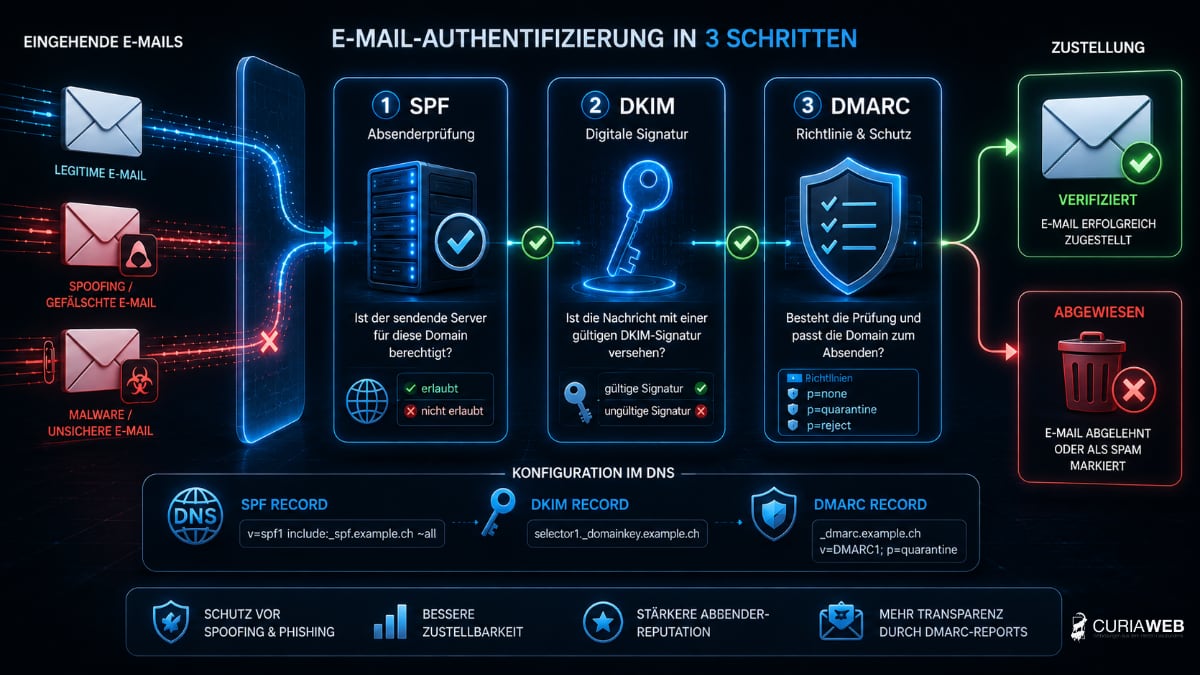
Therefore, check whether important system e-mails actually reach the recipient and whether the sender, SPF, DKIM, and DMARC are configured correctly.
Spam and phishing protection is another part of a clean email infrastructure. You can find information about this at our Email security.
For large newsletter campaigns or extensive transactional email sending, specialized delivery services may be required instead. Classic web hosting and spam filters do not replace a professional mass email service.
10. Don't start just on Black Friday
Perhaps the most important point on this list: Start early enough.
Ideally, a campaign should be fully set up and tested even before the actual launch.
This leaves enough time to correct errors in prices, vouchers, forms, emails, or the checkout.
Internal procedures should also be clear: Who answers customer inquiries? Who can respond to technical issues? Are products available? Are delivery times and shipping information correct?
Black Friday Checklist for Your Website
Before the campaign starts, go through these points again:
- ✓ Website speed checked
- ✓ Mobile view tested
- ✓ Cart and checkout tested
- ✓ Payment methods checked
- ✓ Vouchers and discounts tested
- ✓ Current backup available
- ✓ Important updates performed on time
- ✓ SSL, domain and DNS checked
- ✓ Order and contact emails tested
- ✓ Campaign landing page checked
Conclusion: Preparation is cheaper than downtime
Black Friday and the Christmas shopping season can offer tremendous opportunities for businesses and online stores. That is precisely when the technology needs to function reliably.
You don't necessarily need the most expensive hosting solution or a completely new website for that. The crucial factor is potential vulnerabilities before the rush of visitors to recognize.
Test speed, mobile display, checkout, discounts, emails, and backups early. Then you can focus on what really matters during the actual campaign: your customers and your sales.