

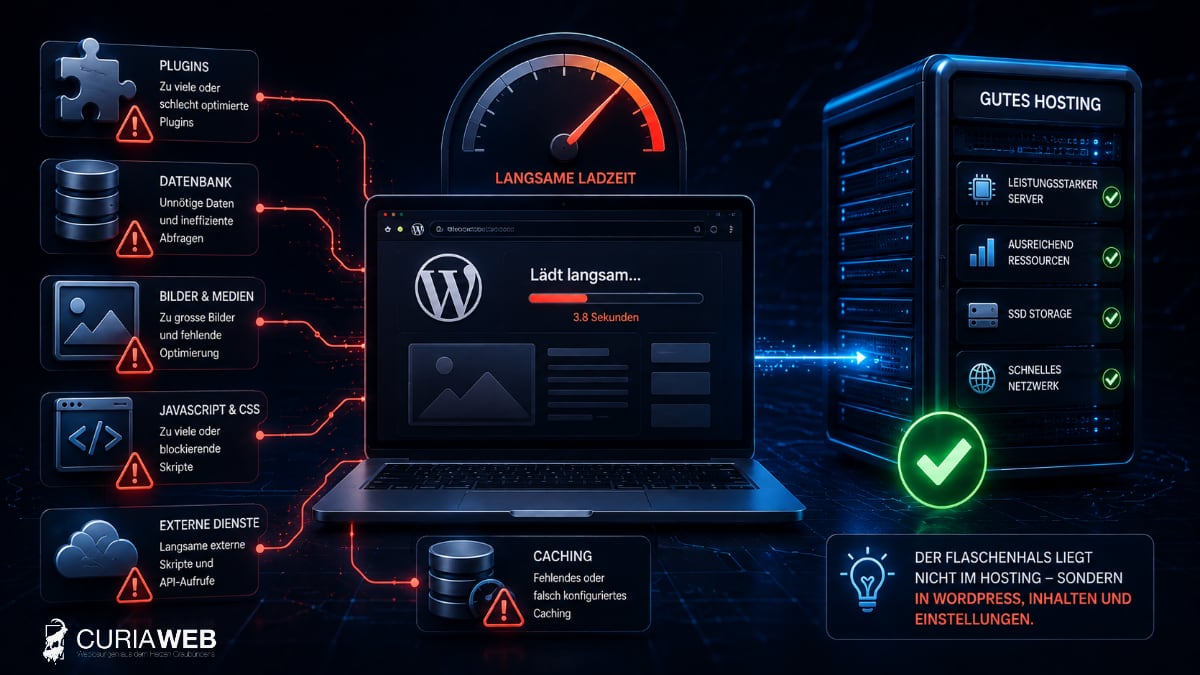
You have powerful WordPress hosting, sufficient resources, and modern server technology—yet your website is loading slowly?
This is by no means unusual. A fast server is an important prerequisite for a fast WordPress website, but it cannot automatically fix issues that arise within WordPress, in the theme, with plugins, or in the visitor's browser.
Precisely for this reason, when experiencing performance issues, it is important not to install plugins at random or immediately switch hosting providers. First, it must be clarified, where the loading time actually occurs.
This guide shows why WordPress can be slow despite good hosting, how to identify typical bottlenecks, and which optimizations are actually useful.
Good hosting alone doesn't make WordPress fast
When a WordPress page is accessed, multiple technical layers interact. The server processes PHP, WordPress accesses the database, plugins and the theme execute additional code, and then the browser has to load and render images, CSS, JavaScript, fonts, and external content.
Hosting only affects a part of this chain.
A powerful WordPress Hosting provides the technical foundation. However, a poorly optimized WordPress installation can still slow down this performance.
First step: Where is WordPress actually slow?
Before anything is optimized, a distinction should be made between different types of performance problems.
Typical situations are:
- The server takes a long time just to respond.
- The first response comes quickly, but the page loads slowly.
- Only certain pages are slow.
- The WordPress backend is sluggish.
- The website only gets slow when there are many simultaneous visitors.
- Mobile devices show significantly worse metrics than desktop systems.
These differences are crucial because they can point to completely different causes.
Server response time and frontend performance are not the same
An important value for troubleshooting is Time to First Byte (TTFB). It describes, in simplified terms, how long it takes for the browser to receive the first data from the server after a request.
If the TTFB is already very high, server configuration, PHP processing, database queries, or WordPress itself may play a role.
If, on the other hand, the server responds quickly while the finished page still takes several seconds, the problem often lies in the frontend.
Then, for example, images, JavaScript, CSS, fonts, or external services must be examined more closely.
Precisely for this reason, the statement „My website loads in five seconds“ is not sufficient for a technical diagnosis. What is crucial is, where those five seconds are lost.
Plugins are among the most common performance killers
Plugins are one of WordPress's greatest strengths. They allow you to add almost any functionality you want.
However, any plugin can cause additional code, database queries, JavaScript, or external connections.
Extensions can be particularly problematic if they:
- perform extensive database queries on every page view
- contact external APIs
- load numerous CSS or JavaScript files
- process statistics or tracking data
- run background processes regularly
The mere number of plugins is not a reliable metric in this regard.
A website with 30 cleanly coded extensions can be faster than a website with ten poorly optimized plugins. The crucial factor is, what the extensions actually do.
Themes and page builders can have a significant impact
The used theme and visual page builder also affect the loading time.
Modern builders enable complex layouts, animations, and responsive designs, but sometimes generate extensive HTML structures, CSS rules, and JavaScript.
That does not mean that Elementor or other page builders are fundamentally slow. The crucial factor is how they are used.
Many nested containers, unnecessary animations, numerous widgets, and additional extension packages can make a page significantly heavier.
A powerful server can quickly generate HTML. However, it cannot take over the browser's job of rendering an unnecessarily complex page.
Images: one of the most common avoidable errors
High-resolution images are among the classic causes of slow websites.
A modern camera or smartphone easily produces images with a file size of several megabytes. For a website, this resolution is often completely unnecessary.
Typical problems are:
- Images are uploaded significantly larger than they are displayed.
- Files are unnecessarily heavily or unsuitably compressed.
- modern image formats are not used.
- Lazy loading is missing or being used incorrectly.
Especially on smartphones and slower internet connections, a few oversized images can make the difference between a fast and a frustratingly slow website.
The WordPress database can grow over time
WordPress stores pages, posts, settings, user information, and numerous plugin data in a database.
As operating time increases, revisions, temporary data, expired transients, or remnants of no longer used plugins may accumulate there.
However, a large database is not automatically slow. It becomes problematic when plugins perform inefficient queries or certain tables grow unnecessarily large.
This is why a database should not simply be cleaned up with just any „optimization plugin.“ A current backup is advisable before making changes, and for mission-critical websites, it should first be determined which data is actually no longer needed.
Caching: important, but not a repair tool
Caching is one of the most effective methods for delivering WordPress faster.
Instead of fully regenerating a page on every request, pre-prepared results can be cached and delivered faster.
Depending on the environment, different methods are used, for example:
- Page Caching
- Browser Caching
- Object Caching
- server-side caching mechanisms
However, caching should not be used to hide fundamental performance issues.
A poorly programmed plugin remains a poorly programmed plugin, even with a cache. At the latest on uncached pages, in the backend, or with dynamic functions, the actual problem resurfaces.
Check PHP version and WordPress configuration
WordPress is based on PHP. The PHP version used and its configuration can therefore have a direct impact on performance and compatibility.
Outdated PHP versions should not be kept running indefinitely just because an older extension still works with them.
At the same time, a PHP version should not be updated without prior testing. Themes and plugins must be compatible with the new version.
A modern hosting environment should therefore provide current PHP versions and allow a controlled transition.
WP-Cron and background processes as a hidden cause
WordPress performs various tasks in the background. Among other things, WP-Cron is used for this.
Plugins can use this to, for example:
- Start backups
- Synchronize data
- Prepare emails
- Update feeds
- Process statistics
If a very large number of tasks or particularly complex tasks are executed, this can burden the website.
Particularly with larger WordPress installations, it is therefore worthwhile to include scheduled background processes in the performance analysis as well.
External services can slow down a fast website
Not everything a website loads comes from its own hosting.
Many WordPress sites use external services such as:
- Web fonts
- Analysis and tracking systems
- social media feeds
- Videos
- Cards
- Chat systems
- Advertising and marketing services
If one of these services responds slowly, it can affect the perceived speed of the entire website.
Self-hosting can exert only limited influence on this.
WooCommerce has special requirements
Performance analysis is even more challenging with a WooCommerce store.
Product pages, shopping cart, checkout, and customer account are dynamic areas that cannot simply be cached completely.
For example, these include:
- Product inquiries
- Stocks
- Shipping calculations
- Tax calculations
- Payment interfaces
Therefore, a WooCommerce shop not only requires fast hosting, but also a configuration tailored to the shop.
For more information, please see WooCommerce Hosting for Swiss Online Stores .
Core Web Vitals: Speed from the user's perspective
For Google and above all for visitors, it is not just how fast the server responds that matters. The decisive factor is the actual user experience.
Therefore, the Core Web Vitals look at, among other things, how quickly the most important visible content appears, how stable the layout remains during loading, and how responsive a page is to user interactions.
Therefore, a website can have a good server response time and still perform poorly in terms of user experience.
This is precisely where frontend optimization, images, JavaScript, fonts, and layout play an important role.
Why regular maintenance is also performance care
WordPress maintenance is often associated only with security and updates. However, it is equally a part of long-term stable performance.
Over time, websites change: new plugins are added, content grows, PHP versions change, and extensions are replaced.
Regular technical inspections help to identify such developments at an early stage.
We explain more about this in the guide WordPress Maintenance & Support for SMEs .
When is the hosting actually to blame?
Of course, the hosting itself can also be the cause of a slow WordPress website.
Examples of this may include:
- permanently high server response times
- regularly exhausted resources
- too low PHP or memory limits
- slow storage systems
- Overload with multiple simultaneous accesses
In this case, pure WordPress optimization only achieves limited results.
We explain the role played by the technical infrastructure in the article Hosting Performance and Fast Web Hosting .
Change hosting or optimize WordPress?
This question cannot be answered in a general way.
If the hosting environment is proven to be the bottleneck, switching providers can make sense. If the problem lies in plugins, the theme, the database, or the frontend, however, the same slow website will simply be copied to a new server.
Therefore, the actual cause should be investigated before making a change.
When a hosting change is necessary, WordPress can usually be migrated without prolonged downtime and without the loss of existing rankings if properly prepared.
We show how this works in the guide Change WordPress hosting – without loss of ranking .
Conclusion: Measure first, then optimize
A slow WordPress website is not automatically a hosting issue.
Good hosting provides processor power, memory, storage, and a suitable server environment. However, what actually reaches the visitor also depends on WordPress, plugins, the theme, the database, caching, images, and external services.
Therefore, the most important rule with performance issues is: Don't guess, measure.
Only when it is clear whether the delay originates on the server, within WordPress, or in the frontend, can targeted optimization be carried out.
This is how a collection of individual performance measures becomes a technically clean solution – and good hosting actually becomes a fast WordPress website.