
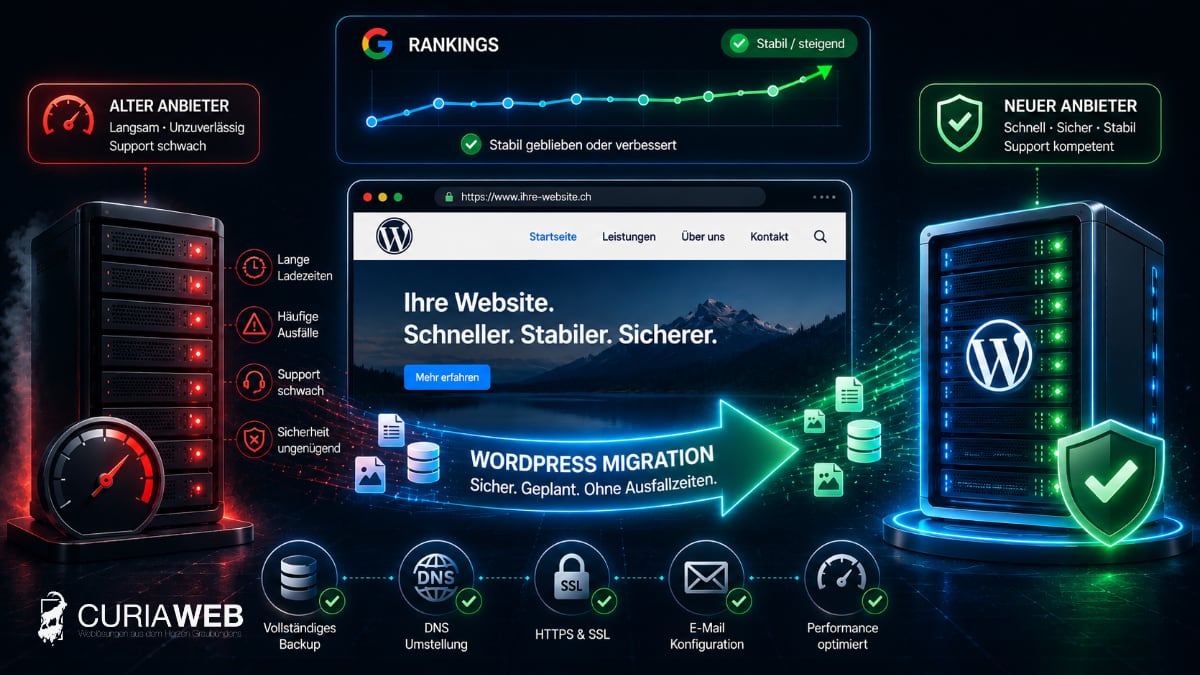
The WordPress hosting is slow, support is hardly any help with problems, or the existing hosting environment no longer fits the website's requirements. In fact, switching providers would have made sense a long time ago.
Nevertheless, many companies hesitate. The most common reason: What happens to my Google rankings when I switch hosting?
The concern is understandable. A poorly planned migration can indeed cause problems. However, a technically cleanly executed change of hosting provider is completely different from a website relaunch: Domain, URLs, content, and website structure can remain unchanged.
This guide explains step by step how to migrate a WordPress website to a new hosting provider, which SEO factors are important in the process, and how downtime and unnecessary ranking risks can be minimized.
Can you change WordPress hosting without losing rankings?
Basically yes. Changing the hosting provider alone is not a reason for a website to lose its existing Google rankings.
The crucial point is that after the migration, Google finds essentially the same website:
- the same domain
- the same URLs
- the same content
- the same internal linking
- the same important metadata
- the same indexable pages
If only the technical infrastructure in the background changes, the website remains largely the same from the perspective of visitors and search engines.
Problems arise primarily when unintended changes are made to URLs, indexing, DNS, HTTPS, or content during a move.
Hosting migration is not the same as domain migration or website relaunch
This distinction is important for the SEO evaluation.
At a pure hosting migration the existing WordPress website is transferred from one server or hosting provider to another.
Ideally, neither the domain nor the URL structure changes in the process. From:
https://www.beispiel.ch/leistungen
will continue after the move:
https://www.beispiel.ch/leistungen
Therefore, in the case of a pure hosting change, new 301 redirects are normally not necessary either.
It looks different if simultaneously:
- the domain is being changed
- HTTP is switched to HTTPS
- URLs are changed
- Directories are being changed
- a new website structure is introduced
- a complete relaunch is taking place
Then it is no longer just a hosting change and additional SEO measures become necessary.
Why companies switch their WordPress hosting
A change of hosting rarely happens without a reason. Often, technical or organizational problems have accumulated over a longer period of time.
Typical reasons are:
- long loading times
- frequent outages or poor accessibility
- insufficient server resources
- outdated PHP versions or technical limitations
- hard-to-reach customer support
- unclear backup strategies
- rising prices without corresponding added value
- lack of support with WordPress issues
Especially for a business-critical website, hosting should not be evaluated solely based on storage space and price. Performance, stability, backups, and support play at least an equally important role during ongoing operations.
For more information on a WordPress-optimized environment, please visit WordPress Hosting at CURIAWEB .
Can better hosting improve Google rankings?
A faster server does not automatically lead to better Google rankings. Such a statement would be too simple.
However, hosting influences technical factors that can be relevant for users and search engines. These include, for example:
- Server response times
- Stability and accessibility
- Performance under load
- technical basis for caching and optimization
Therefore, changing hosts can create an important foundation for a faster and more stable website.
We explain in more detail how hosting, WordPress configuration, and maintenance work together in the article WordPress slow? Why hosting & maintenance are crucial .
Before switching hosting: Document the initial state
Before the first file is transferred, the existing state of the website should be documented.
This is one of the most important steps because it is the only reliable way to check after the migration whether anything has changed.
Things to be documented or reviewed should include, among other things:
- WordPress and PHP version
- active plugins and theme
- Permalink structure
- important URLs
- SSL/HTTPS configuration
- DNS records
- Redirects
- Caching configuration
- robots.txt
- XML Sitemap
- Indexing settings in WordPress and SEO plugins
For a website with relevant organic traffic, important rankings, indexed pages, and technical metrics should also be recorded before the migration.
Create a full backup before the migration
Before every hosting change, a complete backup of the existing WordPress website should be in place.
This includes at least:
- WordPress files
- Uploads and media
- Plugins and Themes
- Database
- important configuration files
The backup should remain available independently of the migration until the move has been fully completed and verified.
We explain why multiple restore points are useful in our guide Backup strategies for SMEs .
Prepare the new hosting environment
The existing website should not simply be shut down and then rebuilt on the new hosting.
The safer approach is to first prepare the new hosting environment in parallel.
This involves transferring files and the database to the new hosting while the previous website remains publicly accessible.
This allows the new installation to be tested before the domain actually points to the new server.
Test WordPress before DNS switch
One of the most important phases of the entire move takes place before the actual switchover.
The migrated website should be tested on the new server, even though the domain still points to the previous hosting for normal visitors.
In particular, the following must be checked:
- Home page and important subpages
- Navigation and internal links
- Images and other media files
- Contact forms
- Login and WordPress backend
- Plugins and dynamic functions
- WooCommerce features in online shops
- HTTPS and Certificates
- Error messages and server logs
Only when the new environment is working should the actual switchover take place.
Caution with staging and search engines
When testing on a temporary domain or staging URL, care must be taken to ensure that this test version is not accidentally indexed by search engines.
Otherwise, identical content could become accessible under multiple addresses.
At the same time, an indexing block set up for staging must not be accidentally transferred to the production website.
A classic error after migrations is, for example, that in WordPress the setting „Prevent search engines from indexing this website“ stays active.
For an SEO-relevant website, checking indexability is therefore an essential part of the post-migration checklist.
Change DNS correctly
When the new WordPress installation has been fully checked, the domain will be switched to the new hosting.
Technically, this is done via the Domain Name System (DNS). Depending on the configuration, for example, A, AAAA, or other relevant records are adjusted.
DNS changes do not become visible everywhere on the internet at the exact same moment. During this transition phase, requests may temporarily still arrive at the old server or already at the new one.
That is exactly why the old hosting not be deleted or deactivated immediately after the DNS change.
Consider TTL before changing hosting
A technical detail that can be helpful during planned migrations is the so-called TTL (Time to Live) the DNS records.
It influences how long DNS information can be cached.
With carefully planned migrations, a timely adjusted TTL can shorten the transition phase after the DNS change.
However, such a change should not be made immediately before the switchover, as the previous TTL must still be taken into account first.
Don't forget your email when changing hosts
A common mistake during a website migration is to think only of WordPress.
If the email accounts are also hosted with the previous hosting provider, it must be clarified whether the email infrastructure will be migrated as well.
The following are to be examined in particular:
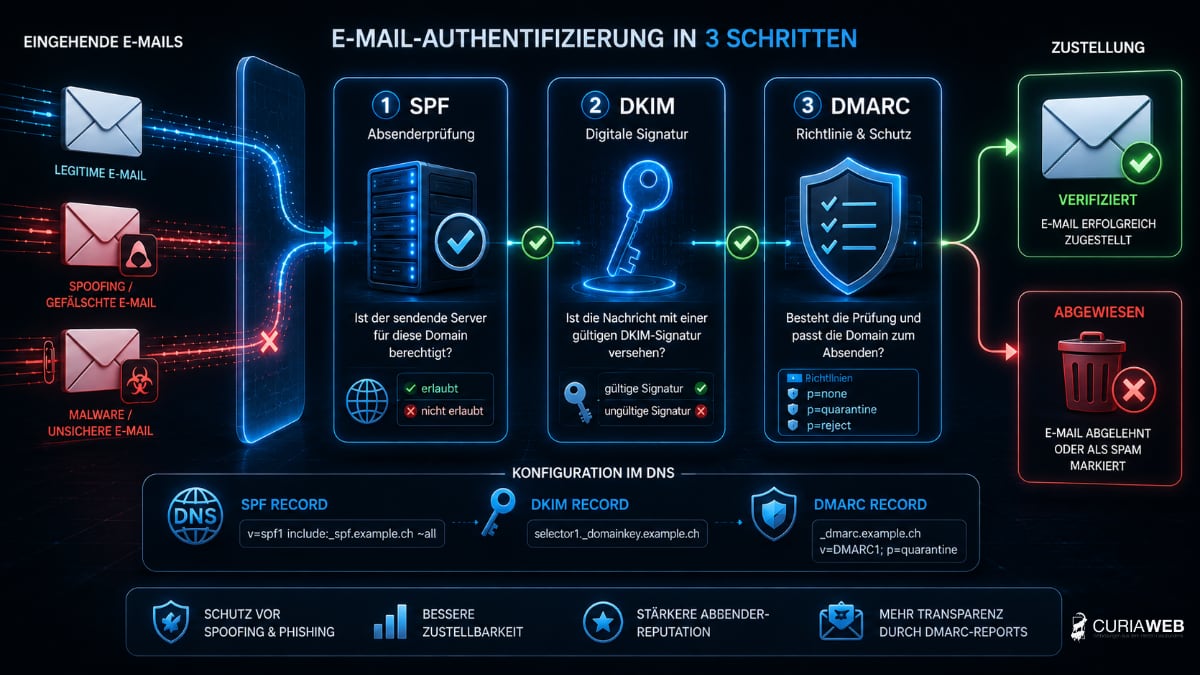
- MX records
- SPF
- DKIM
- DMARC
- existing mailboxes
- Forwards and Autoresponders
An error in this area can cause the website to function perfectly after the switch, but business emails will no longer be delivered correctly.
Learn more about this context at Domain & E-Mail – Why Both Are Inseparably Connected .
Special care with WooCommerce and dynamic websites
With a classic corporate website, little often changes during a short migration phase. With online shops, member areas, booking systems, or heavily trafficked websites, the situation is different.
While the database is being copied to the new hosting, the old system can still:
- Incoming orders
- Customer accounts are created
- Forms are submitted
- comments or other data are stored
If these changes are not taken into account, data may be missing during the final switchover.
For dynamic websites, therefore, a planned final synchronization of the database or a suitable migration procedure is necessary.
URLs must not change simply due to a change in hosting providers
For existing Google rankings, this is one of the most important points.
If only the hosting is changed, there is usually no reason to change URLs.
A site like:
https://www.curiaweb.ch/wordpress-hosting
should also be accessible under the exact same address after the switch.
Anyone who changes URL structures at the same time is combining two different projects: hosting migration and website migration.
This increases the number of potential errors and subsequently makes root cause analysis more difficult if rankings or traffic change.
Check HTTPS and SSL after migration
The website should still be fully accessible via HTTPS on the new hosting.
After the migration, the following should be checked:
- is a valid SSL/TLS certificate active?
- are HTTP calls correctly redirected to HTTPS?
- do mixed content warnings occur?
- Do all HTTPS redirects work as before?
Errors in this area can affect both visitors and search engines.
Check robots.txt, sitemap, and canonical tags
After a WordPress migration, several SEO-relevant settings should be specifically checked.
These include:
- robots.txt Are important areas being blocked by mistake?
- XML Sitemap: Is she still reachable?
- Canonical tags Do they reference the correct URLs?
- Meta Robots: Are important pages still indexable?
Settings from a test or staging environment in particular must not be transferred to the production website without being checked.
Check redirects after migration
With a pure hosting change, no new redirects should be necessary. However, existing redirects must continue to work.
This affects, for example, already existing:
- 301 redirects of old URLs
- HTTP-to-HTTPS redirects
- www/non-www rules
- Redirects from previous relaunches
Depending on the server environment, such rules can be implemented differently. Therefore, they should be tested after the switch.
After the hosting change: Check website completely
After the DNS switch, the migration is not yet complete. Now comes the crucial control phase.
At least the following should be checked:
- Home
- important landing pages
- Navigation
- Forms
- WordPress backend
- 404 error
- Redirects
- HTTPS
- Sitemap
- robots.txt
- Email dispatch
- Loading times
In addition, test orders and important checkout processes should be carried out in an online shop.
Monitor Google Search Console after the migration
After a migration, the website should be monitored more closely for some time.
Google Search Console can help identify unusual changes.
Particularly relevant are:
- Indexing issues
- unreachable pages
- noticeable changes in clicks and impressions
- Issues with important URLs
In the case of a pure hosting change with an unchanged domain, a domain or address change is normally not required in Google.
Should one carry out hosting migration and relaunch at the same time?
If it is not strictly necessary: probably not.
Anyone who changes hosting, design, WordPress structure, URLs, content, and SEO settings all at once creates a huge number of variables at the same time.
If a problem occurs afterwards, it is difficult to determine which change was responsible for it.
For business-critical websites, it often makes more sense to first complete the technical migration cleanly and carry out major structural changes separately.
When should you cancel the old hosting?
Not immediately after the DNS switch.
The old hosting should initially remain in place until it is ensured that:
- DNS has been completely switched
- the website runs stably on the new server
- email works correctly
- no files or data are missing
- backups are available
Only after that should the previous hosting be finally cancelled or deleted.
Checklist: Switch WordPress hosting without losing rankings
- document existing website and SEO status
- create a full backup
- prepare new hosting in parallel
- Transfer WordPress files and database
- Test website before DNS switch
- Protect staging version from indexing
- Leave domain and existing URLs unchanged
- Switch DNS in a controlled manner
- Consider e-mail configuration
- Check HTTPS and SSL
- Check robots.txt and XML sitemap
- Check canonical and meta robots settings
- test existing redirects
- Test forms and important functions
- Monitor Google Search Console
- cancel old hosting only after successful check
Migrate WordPress to CURIAWEB
Anyone who wants to switch hosting providers does not necessarily have to carry out a WordPress migration themselves.
CURIAWEB supports new customers in migrating their existing website to the new hosting environment. The website and technical configuration are transferred in a structured manner and tested before the switchover.
Our Moving service is free and is intended to make the transition easier, especially for companies that do not want to migrate their existing website themselves.
Further information on the procedure can be found at Free website migration service .
You can find suitable hosting offers at WordPress Hosting at CURIAWEB .
Conclusion: Changing hosts doesn't have to be an SEO risk
Fear of losing rankings should not be a reason to stay with an unsuitable hosting provider permanently.
A simple hosting change does not automatically change the domain, URLs, or content of a WordPress website. If the migration is prepared with technical precision, tested in parallel, and switched over in a controlled manner, downtime and SEO risks can be significantly reduced.
Of particular importance are a complete backup, unchanged URLs, a controlled DNS switch, correct HTTPS and indexing settings, and careful monitoring after the migration.
A hosting migration is therefore not a relaunch, but primarily the replacement of the technical infrastructure behind an existing website.
And that is precisely how he should be treated: prepare, migrate, test, switch over and control.