

A custom domain is much more than just a website address. It is a central component of a company's digital identity and is closely linked to the website, email, and numerous other services.
If a domain or its DNS configuration falls under unauthorized control, the consequences can be significant: websites can be redirected, emails can be compromised, and attackers can attempt to abuse the trust in the corporate domain for phishing.
This guide explains the risks associated with domains and DNS, and the measures SMEs can take to effectively protect their domains.
Why Domain Security Matters for Businesses
Domains are often viewed as an administrative task: register, pay, and then try not to think about them again.
Technically speaking, however, a domain is an important control point for several enterprise services. Among other things, the Domain Name System (DNS) determines where a website can be reached and which servers are responsible for email traffic.
Anyone who gains control over the registrar account or the DNS configuration can therefore potentially exert considerable influence on a company's digital infrastructure.
What is domain hijacking?
As Domain-Hijacking is the unauthorized takeover or manipulation of a domain or its administration.
For example, an attacker could try to gain access to the customer account at the registrar and subsequently modify DNS settings or other domain data.
Possible causes include:
- stolen or reused passwords
- Phishing targeting administrators or employees
- compromised email accounts
- missing two-factor authentication
- unclear or outdated administrative responsibilities
The stored email account in particular is security-relevant because password resets and other administrative processes are frequently handled through it.
DNS Manipulation: When the domain suddenly points to a different destination
The Domain Name System specifies which servers a domain is connected to.
The most important DNS records include:
- A and AAAA records for websites and servers
- MX records for receiving emails
- TXT Records for SPF, DKIM, DMARC and verifications
- CNAME Records for redirects to other hostnames
If such records are modified without authorization, for example, a website could point to a third-party server or the email configuration could be compromised.
Therefore, DNS changes should only be made by clearly defined and authorized persons.
Domain and email security are directly linked.
A compromised domain can also affect business email communication.
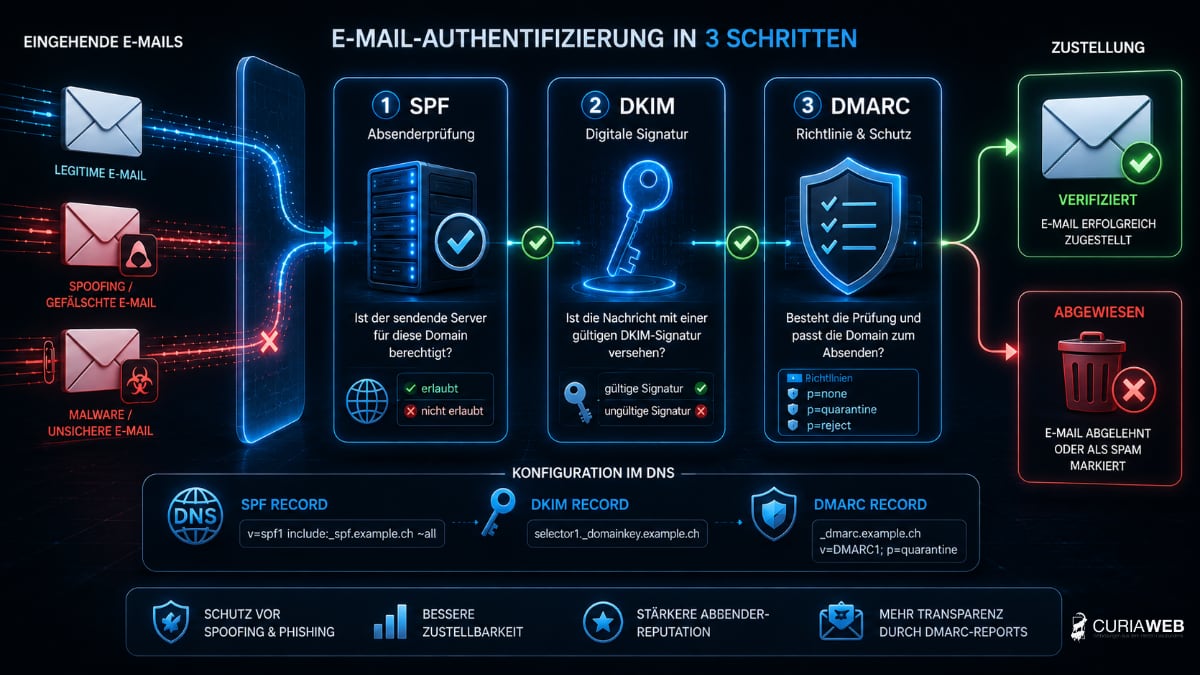
Mechanisms such as SPF, DKIM, and DMARC are controlled via the domain's DNS records and help authenticate legitimate email senders and make the misuse of one's own domain more difficult.
We explain the interaction in more detail in the guide Domain & E-Mail – Why Both Are Inseparably Connected .
Use strong and unique passwords
Access to the registrar or domain management should be particularly well protected.
Use a long, unique password for this that is not used on any other service.
A password manager makes it easier to use strong and unique credentials for different services.
Learn more about this at What is a password manager – and why is it indispensable today? .
Enable two-factor authentication
If the registrar or hosting provider offers two-factor authentication (2FA), it should be enabled for administrative accounts.
A stolen password alone is usually no longer sufficient for a successful login.
This is especially important for accounts used to manage domains, DNS, or hosting.
Protect Transfer Lock and Domain Transfer
For many domain extensions or registrars, protective mechanisms are available that make an unintended or unauthorized transfer more difficult.
Such a transfer lock should remain enabled, provided it is available and no transfer is planned.
Auth codes for domain transfers should also be treated like sensitive access credentials and should not be stored unprotected via email or in freely accessible documents.
We explain how a regular provider change works in the article Domain Transfer Without Downtime: Checklist & Common Mistakes .
Regularly check domain owner and responsibilities
An astonishingly common problem in companies is not technical attacks, but rather unclear ownership and access rights.
Domains should not be controlled exclusively through personal accounts of former employees, external freelancers, or agencies.
Therefore, SMEs should document:
- who the owner or registered organization of the domain is
- which registrar manages the domain
- who has administrative access rights
- which email address is on file for important notifications
- who is internally responsible for renewals and modifications
This also makes domain security a matter of clean organizational processes.
Domain expiration is also a security risk
Even a technically perfectly configured domain can become a problem if its renewal is forgotten.
If a domain is released again after the expiration of the specified deadlines and registered by a third party, this can have significant consequences for the website, email, and corporate identity.
We explain which phases and risks can occur in the article What happens when a domain expires? .
What role do SSL certificates play?
SSL or TLS certificates are also an important part of a secure website, but they serve a different purpose.
They encrypt the connection between the browser and the web server and enable HTTPS.
However, an SSL certificate does not prevent an attacker from gaining access to the registrar account or manipulating DNS records.
Domain security and encrypted data transmission are therefore different levels of protection that should be considered together.
For more information, please visit SSL certificates for secure HTTPS connections .
Manage domain, hosting and email together
Domain security cannot be completely separated from hosting and email.
If multiple providers are involved, in the event of a disruption, it must first be clarified who is responsible for the domain, DNS, website, and email.
A centrally organized infrastructure can simplify responsibilities and error analysis. The crucial factor is not necessarily that everything must be with the same provider, but rather that access, responsibilities, and configurations are properly documented.
You can find more basics on domain management in our Guide to Domains in Switzerland .
Checklist: Domain Security for SMEs
- use a unique and strong password for domain management
- Enable two-factor authentication
- review administrative user accounts regularly
- Enable transfer lock if available and advisable
- Keep Auth-Codes confidential
- Document DNS records and control changes
- Configure SPF, DKIM, and DMARC correctly
- Keep domain owner and contact details up to date
- check automatic renewal or expiration dates
- Documenting responsibilities within the company
Conclusion: The domain is part of the security concept
Domains are not merely an administrative matter, but a security-critical component of a company's digital infrastructure.
Anyone who gains access to domain management or DNS may be able to affect the website, email, and other services. Accordingly, these access credentials should be protected with great care.
Strong access credentials, two-factor authentication, controlled DNS changes, clear responsibilities, and reliable domain management significantly reduce the risk.
For SMEs, domain security is therefore not a specialized topic for large IT departments, but a fundamental component of a professional online presence.